BuzzStream Review for Link Builders: Pricing, Plans, Verdict
BuzzStream is a solid outreach CRM for link building and digital PR teams that pitch by hand and want every relationship, email and placed link in one shared record. This BuzzStream review comes down to one pricing fact: the $49 Starter plan has no bulk sending and no automated follow-ups, so for most link builders the real entry price is the $174 Growth plan for three users.
That makes BuzzStream a good fit for agencies of three to ten people who write their own pitches, and a poor fit for solo link builders on a budget or teams that want prospecting and pitch writing done for them. Below are the current plans and what each one leaves out, what a team pays as it grows, where the tool holds up and where users say it does not, and how it compares with Pitchbox and linkOreach.
BuzzStream at a glance
BuzzStream has been around since 2008 and is built around a contact database rather than a sending engine. You add sites and people to projects, BuzzStream looks for contact details and site metrics, you send outreach from your own mailbox, and every email, note and placed link is logged against the contact so your team can see who talked to whom and when.
- Best for: agencies and in-house teams that pitch by hand, run several clients, and want shared relationship history and link reporting.
- Not for: solo link builders who need automated follow-ups on a $49 budget, or teams that want an agent to build lists and write per-site pitches.
- Price: $49, $174 and $424 a month for the three self-serve plans, and custom plans from $999 a month.
- Sending: from your own Gmail, Office 365, Exchange or any IMAP and SMTP mailbox.
- Contract: monthly, no minimum term; paying a year up front gets one month free.
What BuzzStream does
The product covers four jobs, and it is stronger at the last two than the first two.
Research and prospect lists
You can turn a search results page or a list of URLs into a prospect list, and BuzzStream fills in contact information, website stats and social metrics for each site. The BuzzMarker Chrome extension adds a site or person to a project while you browse, which is how many teams build lists from Google results by hand. Automatic prospecting runs web and news searches for you, but the number of prospecting searches is capped by plan: 30 a month on Starter, 250 on Growth and 1,000 on Professional. Growth also adds an Ahrefs integration for site metrics.
Outreach and follow-ups
Emails go out from your connected mailbox using saved templates, with open, click and reply tracking on every plan. You can send one at a time with a personalized first line or, on Growth and above, in bulk with scheduling. Automated follow-ups also start at Growth: you set the rules and BuzzStream sends the next step to contacts who have not responded. Each connected mailbox can have its own daily send limit, which BuzzStream's help article on send limits recommends setting below your provider's cap so replies and other email still have room.
Managing projects and relationships
This is the core of the tool. Each contact keeps its full email history, notes and status across projects, teammates can see each other's conversations, and you can assign tasks and filter for who needs a follow-up. For an agency that pitches the same editors for different clients, that shared history is what stops two people from emailing one editor in the same week.
Reporting
BuzzStream's reporting suite covers template and subject line performance, a funnel and aging chart per project, placement trends by team member, and links broken down by type, anchor text and domain authority. Link monitoring is included on every plan, from 1,000 links on Starter to 100,000 on Professional. Template and subject line reports are the useful ones for testing pitches; the team leaderboards matter mostly to agencies with several link builders.
BuzzStream pricing in 2026
The BuzzStream plans and pricing page lists four plans. The table puts the limits that matter for link building side by side.
| Plan | Price a month | Users included | Contacts | Prospecting searches a month | Bulk send and automated follow-ups |
|---|---|---|---|---|---|
| Starter | $49 | 1 | 500 | 30 | No |
| Growth | $174 | 3, then $58 each | 25,000 | 250 | Yes |
| Professional | $424 | 6, then $70 each | 100,000 | 1,000 | Yes |
| Custom | From $999 | 12 or more | 300,000 or more | Custom | Yes |
Professional adds backup recipients, team performance reports, unlimited report customization, API access and a dedicated account manager. Custom adds an implementation plan and onboarding. All plans are monthly, and the free trial can be canceled from the account settings without a charge.
Two pricing details trip people up. First, older reviews quote BuzzStream at $24 or $99 a month; $24 is the entry price of ListIQ, a separate media list product covered below, and $99 belongs to an older plan lineup. Lower down the same pricing page there is still a legacy comparison table with Solo, Starter, Plus and Premium plans at $19 to $249; the four plan cards at the top are the ones the trial page offers. Second, if you cancel, BuzzStream keeps your account data for 14 days and then deletes it, so export contacts and link reports before you leave.
The Starter plan has no automated follow-ups
Starter includes contact discovery, tracking, templates, the Chrome extension and link monitoring. It does not include bulk sending, scheduling, reminders or automated follow-ups. For link building that is a large gap, because follow-ups sent by hand are the first thing to slip when a campaign gets busy; we cover how far apart to space follow-ups in a separate guide.
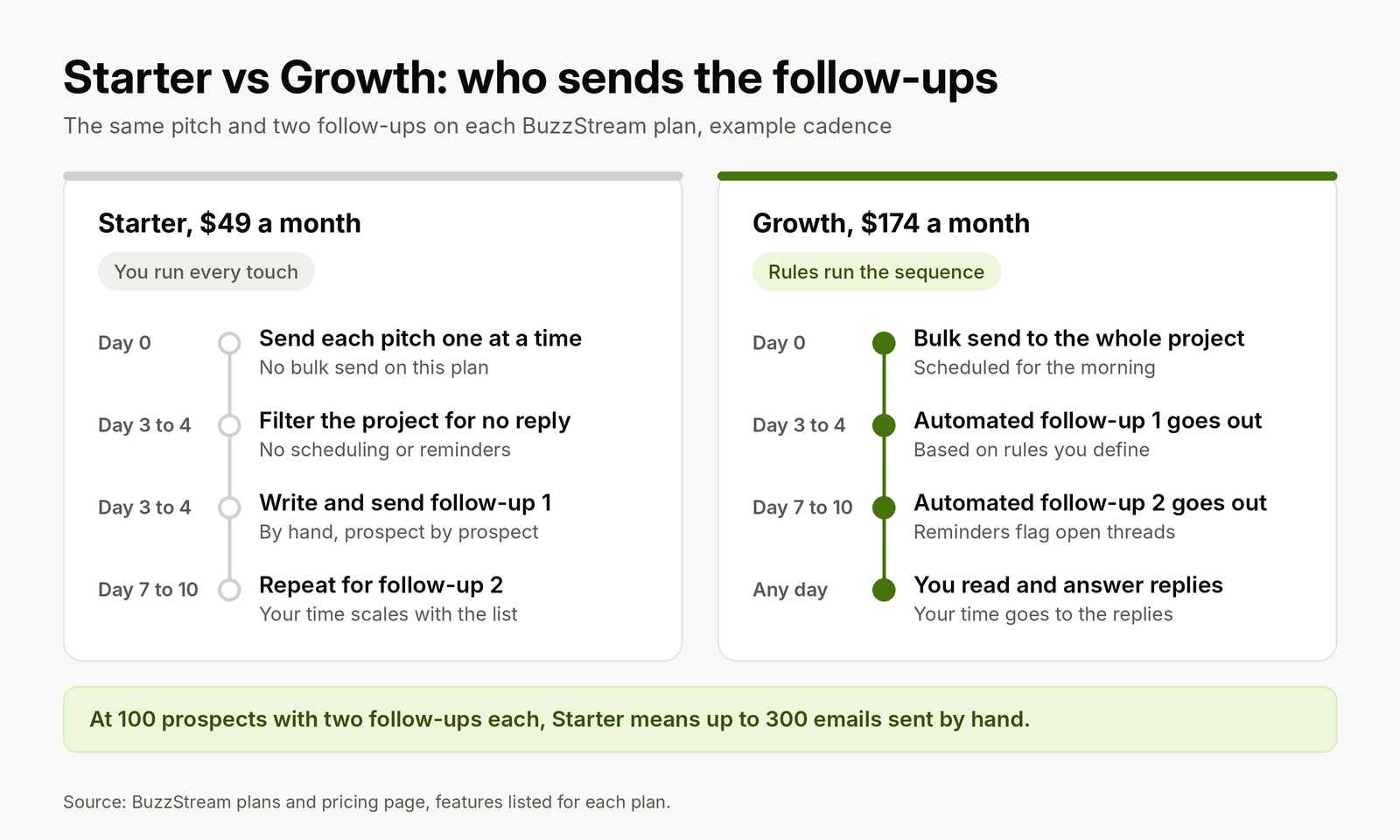
On Starter, every touch in a sequence is a manual send. Growth hands the follow-ups to rules you set.
The 500-contact limit is the second ceiling. If you add 100 new prospects a month, the database is full after five months unless you delete old contacts, which also deletes the relationship history that is the point of a CRM. Starter works for a freelancer running a few small, hand-written campaigns a month. Anyone sending sequences at volume should price BuzzStream from Growth.
What a team pays as it grows
Growth includes three users and charges $58 for each one after that. Professional includes six and charges $70 each after that. Because the add-on price on Growth is lower, Growth stays the cheaper plan at every team size; you move to Professional for the API, backup recipients and team reporting, not to save money.
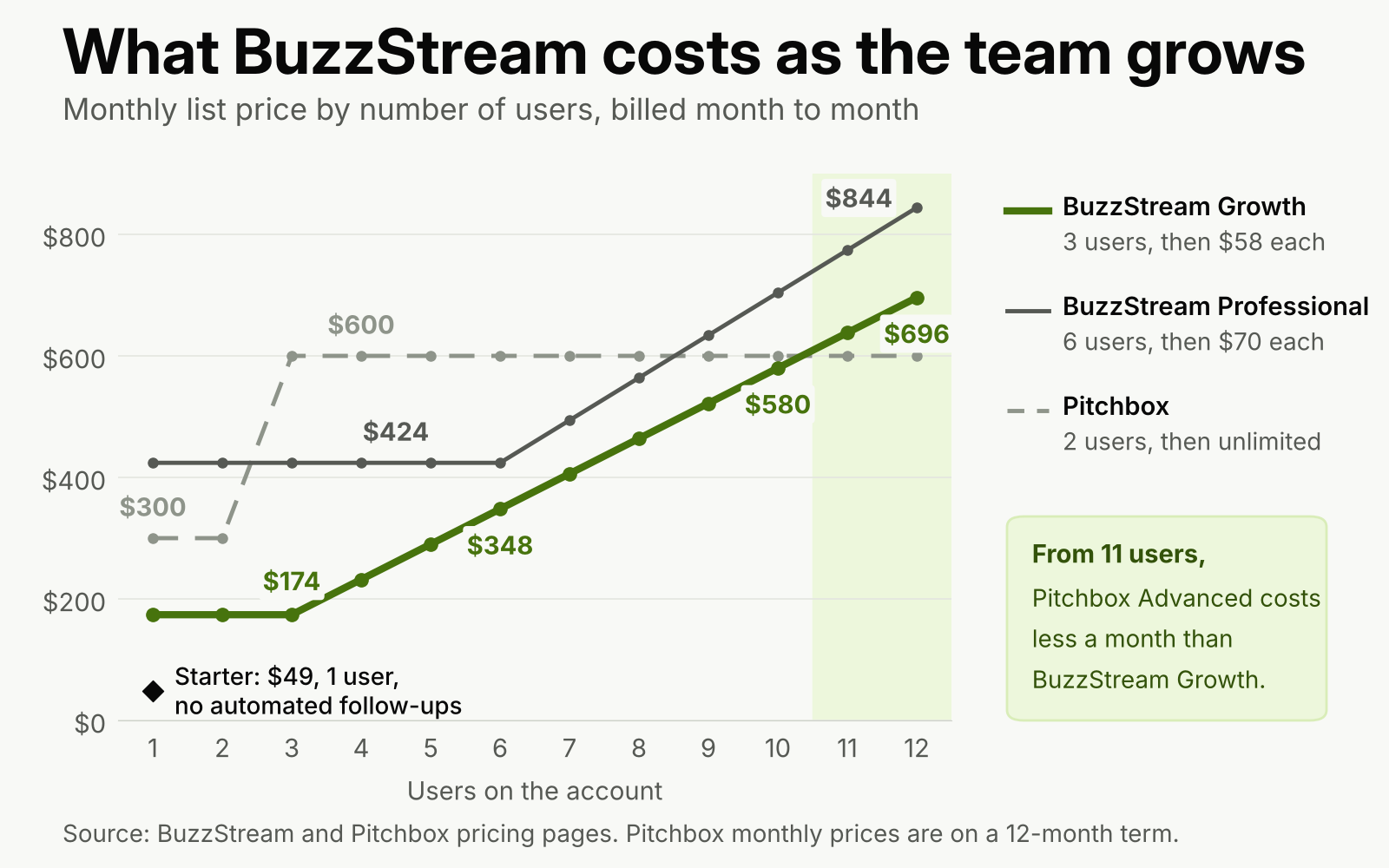
BuzzStream's per-user pricing is cheap for small teams and climbs steadily. Pitchbox's flat plan crosses it at 11 users.
Pitchbox prices the other way. Its Pro plan is $300 a month for two users and its Advanced plan is $600 a month with unlimited users, both on a 12-month term, or $210 and $420 a month billed annually. A team of four pays $232 a month on BuzzStream Growth and $600 on Pitchbox Advanced. A team of 11 pays $638 on Growth and still $600 on Pitchbox.
Worked example: a four-person agency team
Say an agency has four link builders, runs outreach for six clients, and adds about 400 prospects a month across guest posts, resource pages and unlinked mentions.
- Plan: Growth, since Starter has one user and no automated follow-ups.
- Monthly price: $174 for three users plus $58 for the fourth, so $232 a month, or $2,784 a year.
- Annual option: pay 11 months up front for 12, so $2,552 a year, about $213 a month.
- Contacts: 400 a month is 4,800 a year, well inside the 25,000 limit.
- Prospecting searches: 250 a month is enough if most lists come from your own Ahrefs exports and SERP pulls rather than BuzzStream's search.
- Not included: AI pitch writing and an email finder you can rely on for named contacts (see the next section), so budget time or a separate tool for both.
What BuzzStream does well
The relationship record is the reason to buy it. Every conversation with an editor stays attached to that editor across clients and years, which matters when the same 200 sites in a niche get pitched again and again.
Sending from your own mailbox is the second strength. BuzzStream connects to Gmail and Google Workspace, Office 365, Exchange or any IMAP and SMTP account, adds an unsubscribe line you can edit, and lets you set who on the team can see or send from each mailbox. You keep control of your sender reputation, which also means you own the setup work; read our guide to authenticating a mailbox before it sends outreach before you connect a new domain.
Third, link reporting by type and anchor text is built in. Most general cold email tools stop at replies; BuzzStream tracks the placed link itself, which is what a link building client pays for.
Where BuzzStream falls short
On Capterra, BuzzStream holds a 4.4 out of 5 average from 21 reviews, a small sample but a consistent one. These complaints come up more than once:
- Contact data quality. Some reviewers say contact discovery often returns generic site addresses rather than the editor or author, so they verify contacts elsewhere before sending.
- Interface and learning curve. Some users describe the interface as functional but dated, and say it takes time to learn without more tutorials.
- Price changes. A small agency reviewer wrote in 2025 that a price rise forced a budget rethink, and the per-user pricing above explains why it hurts teams of four or more.
- Tracking gaps. Individual reviewers report replies arriving from contacts BuzzStream showed as unopened, and email threads not always syncing. Treat open rates as a rough signal at best; reply rate is the number to manage.
There is also a gap that reviews rarely mention because it is about what the product does not attempt. The outreach pages describe templates, personalization fields and rule-based follow-ups; they do not describe AI-written pitches per site or an agent that builds and qualifies a list from a brief. BuzzStream's AI work has gone into ListIQ instead.
ListIQ is a separate product
ListIQ, BuzzStream's newer product, builds journalist lists from Google News articles with AI research on each writer: recent articles, bios and contact details. It is aimed at digital PR teams and priced separately on the ListIQ pricing page, from $24 a month for 500 standard credits and 50 email credits up to $399 a month for 16,000 and 1,600. If your link building runs on pitching journalists for press links, the pair covers list building and outreach; for guest posts, niche edits and resource pages, ListIQ adds little.
BuzzStream vs Pitchbox vs linkOreach
All three are built for link building rather than sales email. The differences are in how they price seats, how much of the workflow they automate, and how much prospecting data comes with the plan.
| Tool and plan | Price a month | Seats and volume | Automated follow-ups | Built for |
|---|---|---|---|---|
| BuzzStream Starter | $49 | 1 user, 500 contacts, 30 prospecting searches | No | Solo, hand-sent pitches |
| BuzzStream Growth | $174 | 3 users ($58 each after), 25,000 contacts, 250 searches | Yes | Small agency teams |
| Pitchbox Pro | $300 on a 12-month term, or $210 billed annually | 2 users, 2 mailboxes, 2,000 outreach emails, 50,000 contacts | Yes | One website's link building |
| Pitchbox Advanced | $600 on a 12-month term, or $420 billed annually | Unlimited users, 6 mailboxes, 5,000 outreach emails, 200,000 contacts | Yes | Agencies with several clients |
| linkOreach | $49 (introductory, down from $59) | 500 email credits, 5,000 searches, 100,000 Ahrefs credits | Yes, stops on reply | Agent-run or manual outreach |
Pitchbox includes an email finder and verifier, Ahrefs, Semrush, Moz and Majestic metrics, and AI personalization on every plan, so it does more of the prospecting work than BuzzStream does. It costs more for small teams and commits you to a year. BuzzStream is cheaper up to ten users, month to month, and its relationship history is the more mature of the two. For a wider field, including general cold email tools, see our outreach tools compared for link builders, and for blogger campaigns specifically, our blogger outreach software side by side.
Who should pick BuzzStream, and who should not
Pick BuzzStream if you run an agency or in-house team of three to ten link builders, write most pitches by hand, pitch the same editors across clients, and want link reporting your clients can read. Growth at $174 a month is the plan for you, and the annual payment saves a month.
Pick something else if you work alone and need automated follow-ups for under $100 a month, if your team is 11 people or more (Pitchbox Advanced is cheaper per month from there), if you need reliable named contacts without a second tool, or if you want prospecting and per-site pitches handled for you.
Where linkOreach fits
We built linkOreach for the stage BuzzStream leaves to you: building the list and writing the pitches. Linkzy, the AI agent inside linkOreach, takes a brief, pulls prospects from Ahrefs with DR and traffic loaded, looks for the SEO lead or content contact at each site and verifies the address, writes a pitch for each site from its content, sends follow-ups on a cadence and stops when someone replies. You can edit every email before it goes out or run every step by hand. Campaign types cover guest posts, niche edits, listicles, blogger outreach, link exchange and brand mentions, with a shared inbox, A/B testing of pitches, competitor backlink gap analysis and per-campaign reports; our features page shows each one.
We currently offer one plan at $49 a month, an introductory price down from $59, with a 7-day trial and no credit card; what our single plan includes lists the credits and top-ups. Choose BuzzStream instead if a long relationship history across many clients matters more to you than automated prospecting and pitch writing, or if your team does mostly journalist outreach and wants ListIQ alongside it. Once links are agreed, tracking orders, vendors, client reporting and invoicing is a different job, and BuildLinks is built for that side of the work.
Conclusion
Price BuzzStream from the Growth plan, not Starter: $174 a month gets three users, 25,000 contacts, bulk sending and automated follow-ups, and each extra user adds $58. That is good value for a team of three to ten that pitches by hand and needs shared relationship history and link reports. Below that, Starter's missing follow-ups and 500-contact cap bite fast; above ten users, Pitchbox's flat $600 plan costs less each month.
Before you commit, run the free trial on one live campaign, check how many named contacts discovery finds against your own list, and export your data if you leave.
If you want the list building, contact finding and per-site pitches done for you as well, start a free 7-day linkOreach trial and run your next campaign through Linkzy.
Frequently Asked Questions
How much does BuzzStream cost?
BuzzStream has three self-serve plans: Starter at $49 a month for one user, Growth at $174 a month for three users plus $58 for each extra user, and Professional at $424 a month for six users plus $70 for each extra user. Custom plans start at $999 a month for 12 or more users. Plans are monthly, and paying a year up front gets one month free.
Is BuzzStream worth it for link building?
For a team of three to ten link builders who write their own pitches and want shared relationship history and link reports, the Growth plan is good value. For a solo link builder it is harder to justify, because the $49 Starter plan has no bulk sending or automated follow-ups and caps the database at 500 contacts.
Does BuzzStream send automated follow-ups?
Yes, from the Growth plan up. Growth adds bulk sending, email scheduling, reminders and automated follow-ups based on rules you set. The Starter plan does not include any of these, so every follow-up on Starter is sent by hand.
Is BuzzStream a CRM?
Yes, in practice it is a CRM for outreach. Each contact keeps its email history, notes, status and placed links across projects, and teammates can see each other's conversations. It sends email through your own connected mailbox rather than its own servers.
Does BuzzStream have a free trial?
Yes. The Starter, Growth and Professional plans each have a free trial, and you are not charged if you cancel during the trial from the account settings. After you cancel a paid plan, BuzzStream keeps your data for 14 days and then deletes it, so export what you need first.
What is the difference between BuzzStream and ListIQ?
BuzzStream is the outreach CRM: lists, sending, follow-ups, relationship history and link reporting. ListIQ is a separate BuzzStream product that builds journalist lists from Google News with AI research on each writer, priced from $24 to $399 a month by credits. Digital PR teams sometimes use both; most guest post and niche edit campaigns need only the outreach product.