Cold Email Subject Lines for Link Building: 32 to Copy
The best cold email subject lines for link building name the recipient's page or the specific thing you are offering, in four to seven plain words, and read like a note from a colleague rather than a campaign. "Newer figure for your [topic] guide" gets opened and answered because the editor knows what the email is about before opening it; "Quick question" and "Collaboration opportunity" do not.
Most lists of cold email subject lines are written for sales teams booking demos. Link requests are a different ask: the editor is judging one change to one page, and a subject line that hides that change wastes the one advantage you have. Below are 32 subject lines grouped by campaign type, what the large datasets say about length and personalization, the subject lines Gmail and US law rule out, and how to test subject lines when most campaigns are too small to test them properly.
What makes a good cold email subject line for link building
A good subject line for a link request does three jobs: it tells the editor which of their pages you mean, what you are offering, and that a person wrote it. Everything else is decoration. In practice that comes down to six rules:
- Name their page or topic. "Your [topic] guide" or the article title itself. Editors maintain dozens of posts, and the subject line is where they decide whether this one is worth their time.
- Describe the offer, not a teaser. "Broken link on your [page title]" beats "Found something on your site". Curiosity gaps read as sales tactics to editors who are pitched often.
- Four to seven words. Long enough to be specific, short enough that the important words survive on a phone screen.
- Sentence case, no exclamation marks, no emoji. Write it the way you would title an email to a coworker.
- Make it match the first line. The preview text under the subject is the first sentence of your email. If the subject promises a newer figure, the first sentence should name it.
- Never fake a reply. "Re:" and "Fwd:" belong to real replies and forwards only.
The subject line, the sender name and the preview line are read together, in about a second. Treat them as one unit when you write the email, and start from the first-email pitches for each campaign type so the body already says what the subject promises.
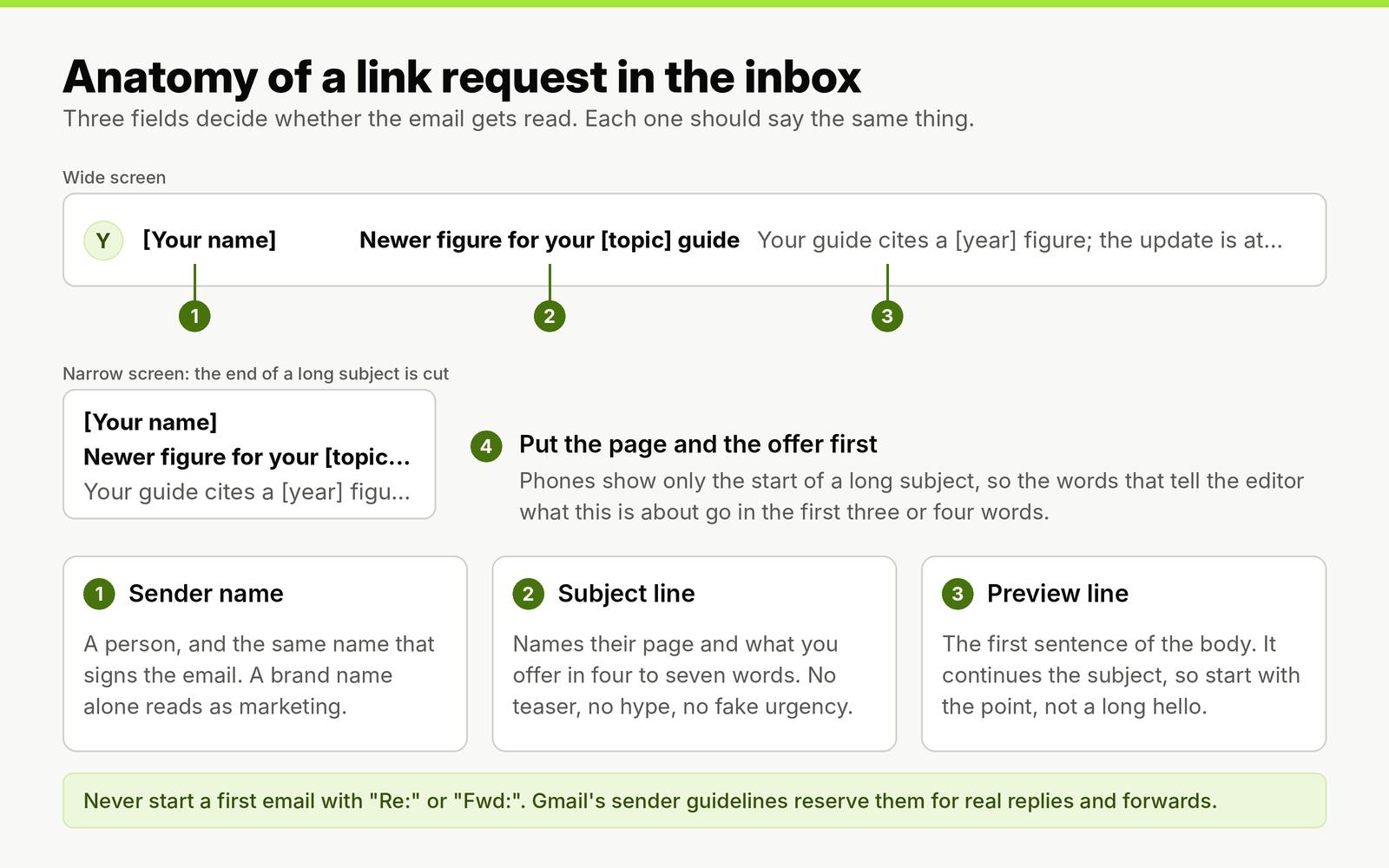
The editor sees three fields at once. If the subject and the first sentence say different things, the email reads as a template.
How long should a cold email subject line be?
Four to seven words is the range we use, and the three largest datasets on cold email subject lines explain why it is a range rather than a single number. They measured different things, and they disagree in a useful way.
| Source | Data behind it | What it found about length and format |
|---|---|---|
| Belkins, B2B cold email subject line study (2025) | 5.5 million B2B cold emails sent in 2024 | Open rates of 46% for two to four words, 38% for one word, 35% for nine words and 34% for ten; lines with numbers 27% against 28% without |
| Hunter, The State of Email Outreach 2026 | 31 million emails sent by Hunter users in 2025 | Five to six words produced the best average reply rates; emojis in the subject or body made no meaningful difference to replies |
| Backlinko and Pitchbox outreach study (2019) | 12 million outreach emails sent through Pitchbox | Subject lines of 36 to 50 characters had the best response rate; personalized subject lines lifted responses by 30.5% |
Read the rows by what each one measured. The shortest lines win on opens, the medium lines win on replies, and the only dataset made of link building outreach favors 36 to 50 characters, which is roughly five to eight words. A two-word subject such as "Your guide" gets opened out of curiosity and then has to explain itself; a ten-word subject explains everything and gets skimmed past. Four to seven words fits a page reference and an offer, and nothing else.
Character count matters less than word order. Phones cut long subjects at the end, so put the words that carry the meaning first: "Broken link on your [page title]" survives truncation, while "I was reading your site and noticed a broken link" does not.
Personalization, questions and "Quick question": what the data shows
Personalization is where subject lines move reply rates, not just opens. Across 5.5 million B2B cold emails, personalized subject lines raised opens from 35% to 46% and replies from 3% to 7%. A finer cut points the same way: subject lines with two custom attributes averaged 40.2% opens against 35.4% with one.
For a link request, the useful personalization is the page, not the person. "[First name], quick idea" is personalized in the mail merge sense and tells the editor nothing. "Your [article title] cites a [year] figure" uses one custom field and carries the whole pitch. If you add a second field, make it the editor's topic or section; the gap between one and two custom fields suggests it is worth the extra work.
Question subject lines also did well, at 44% to 46% opens. The one question to drop is the most common one: "Quick question" averaged 28.7% opens and a 2.5% reply rate across 31 million emails sent in 2025, against 32.9% and 2.9% for other subject lines. It has become a recognizable cold email opener, and it hides the ask, so editors treat it as a sales email. A question works when it is specific and easy to answer: "Still updating your [topic] list?" gives the editor a yes or no about their own page.
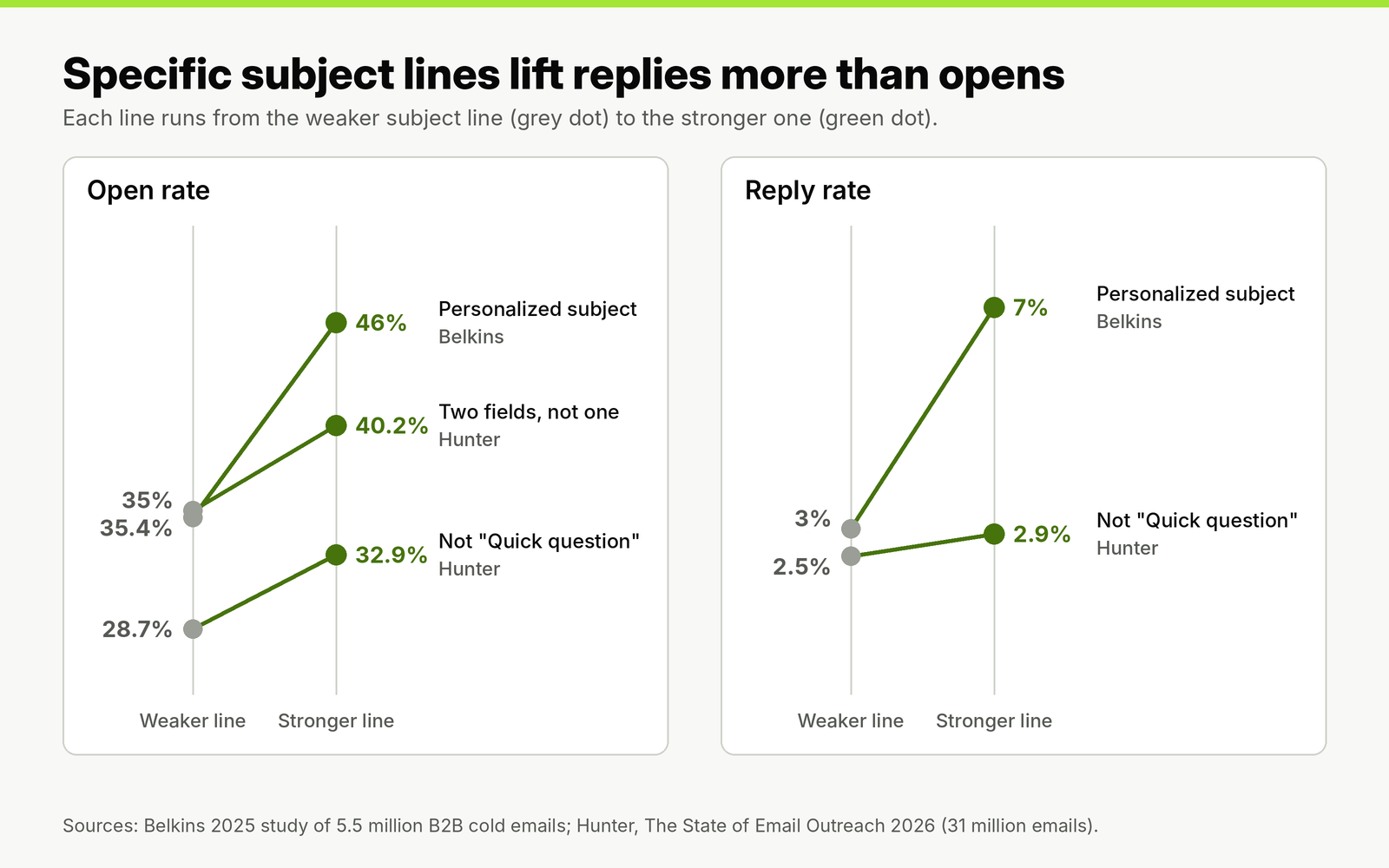
Personalization more than doubled replies in the B2B data, while the open rate rose by about a third. Opens are the weaker signal of the two.
32 cold email subject lines for link building, by campaign type
Each group below matches one campaign type. Replace the bracketed placeholders with the real page title, topic or asset; a subject line with an unfilled or generic placeholder is worse than a plain one. The first line under each heading says when to use that group.
Guest post pitches (5)
Use these when you are offering a finished topic idea to a site that publishes contributor posts. Name the topic, not the fact that you want to write.
- Article idea for [site name]: [topic]
- [Proposed title] for your [section] section
- Contributor pitch: [topic] for [audience]
- A follow-on to your [article title]
- [Topic] guide with [type of data] for [site name]
Niche edits and outdated figures (5)
Use these when an existing article would be better with your page cited in it: a stale statistic, a missing example, a section your page covers in more depth.
- Newer figure for your [topic] guide
- Updated [year] data for "[article title]"
- Source for the [statistic] in your [topic] post
- Example for the [section heading] section
- One addition to "[article title]"
Listicle and roundup inclusion (4)
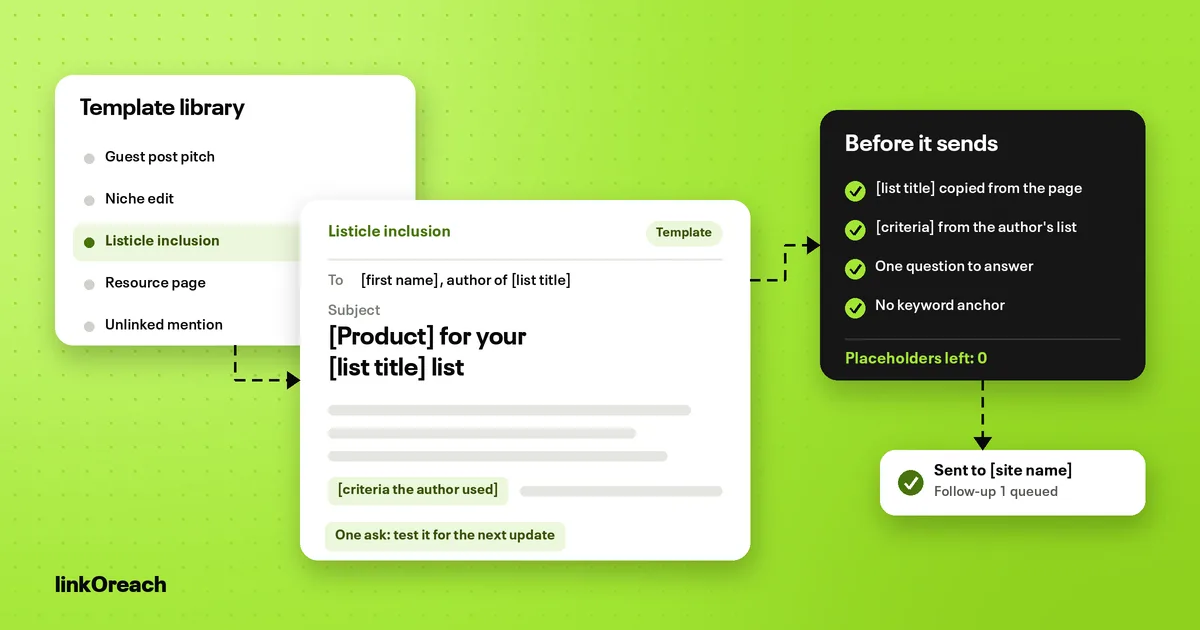
Use these when you want your tool or resource added to a "best [category]" list. Say what you are and how you differ in a few words.
- [Product] for your [category] list
- A [category] tool for [specific use case]
- Your [list title]: one missing option
- [Category] list: pricing and details for [product]
Resource page additions (4)
Use these for curated link lists, library guides and "further reading" sections. Curators respond to the name of the list and a one-line description of what you add to it. Finding the lists comes first, with the search queries behind pitching curated resource lists.
- Suggestion for your [list name] page
- Resource for your [topic] links
- [Resource name] for your [audience] resources
- Still updating your [topic] list?
Broken link replacements (4)
Use these when a link on their page returns an error and your page covers the same thing. Lead with the fix; it is the most useful thing you can tell an editor.
- Broken link on your [page title]
- Dead link in "[article title]"
- The [linked resource] link on your [page] is down
- 404 on your [topic] resources page
Unlinked brand mentions (3)
Use these when the page already mentions your brand or data without a link. The editor has already chosen to cite you, so keep it short and grateful.
- Thanks for mentioning [brand] in [article title]
- Link for the [brand] mention in your [topic] post
- Source page for the [brand] stat you cited
Data and digital PR pitches (4)
Use these when you are offering original data, a study or an expert comment to a writer who covers the topic. Put the finding in the subject line itself.
- New data: [finding in five words]
- [Number] [things] studied: [headline result]
- Expert comment on [news topic]
- [Region] data for your [beat] coverage
Follow-ups (3)
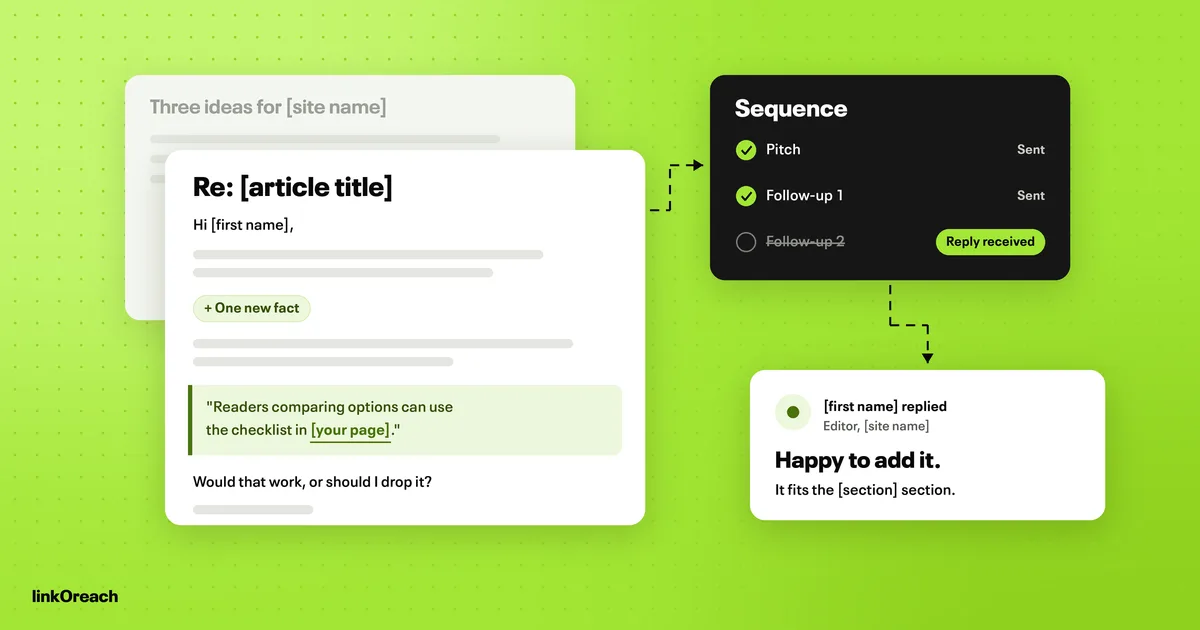
Most follow-ups should reply in the same thread and keep the original subject, which shows as "Re:" because it is a real reply. Use a new subject only when you start a new thread, for example after an out-of-office or a referral to a colleague.
- [Colleague's name] suggested I write to you
- After your time away: [original topic]
- The paragraph I mentioned in [article title]
How many follow-ups to send, and how far apart, is a separate decision from the wording; we send two, three to four business days and then a week apart, and stop on any reply.
Two pitches that show the subject and first line working together
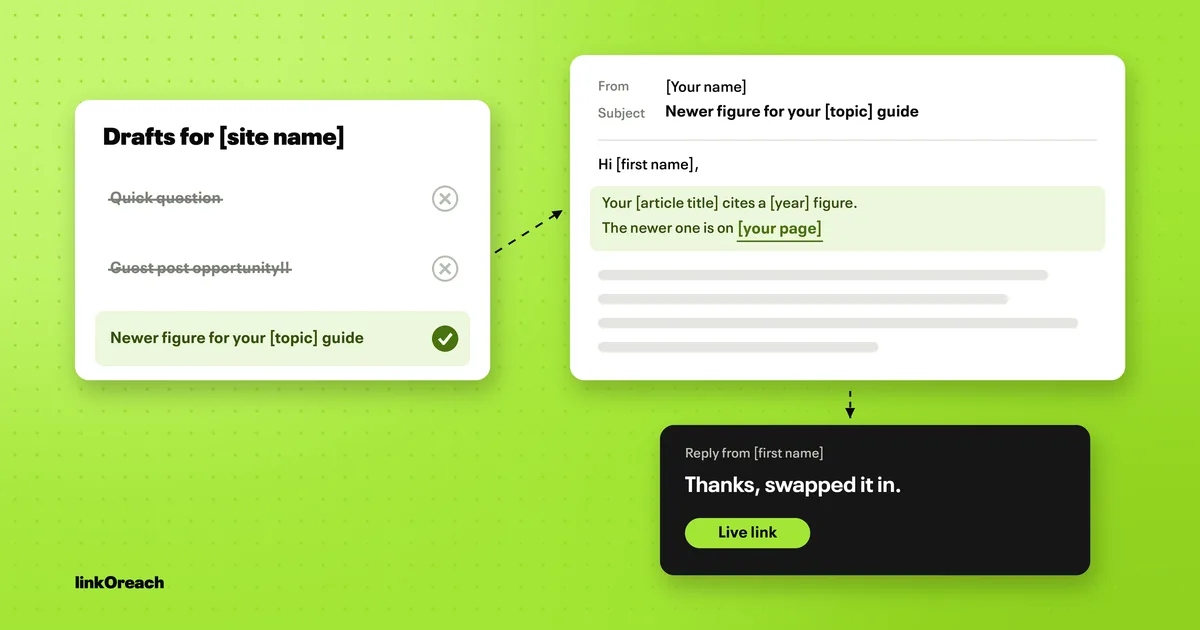
A subject line only works if the first sentence pays it off. Here is a niche edit pitch where the subject, the preview and the ask all point at the same figure:
Subject: Newer figure for your [topic] guide
Hi [first name],
Your "[article title]" cites a [year] figure for [metric] in the section "[section heading]". The [newer year] number is [new figure], from [your page title], which explains the method and links the raw data.
If you refresh that section, a sentence like "[updated sentence with the figure]" would fit, with a link to [URL] as the source. Use it, change it or skip it as you like.
[Your name]
[Title, company, URL]
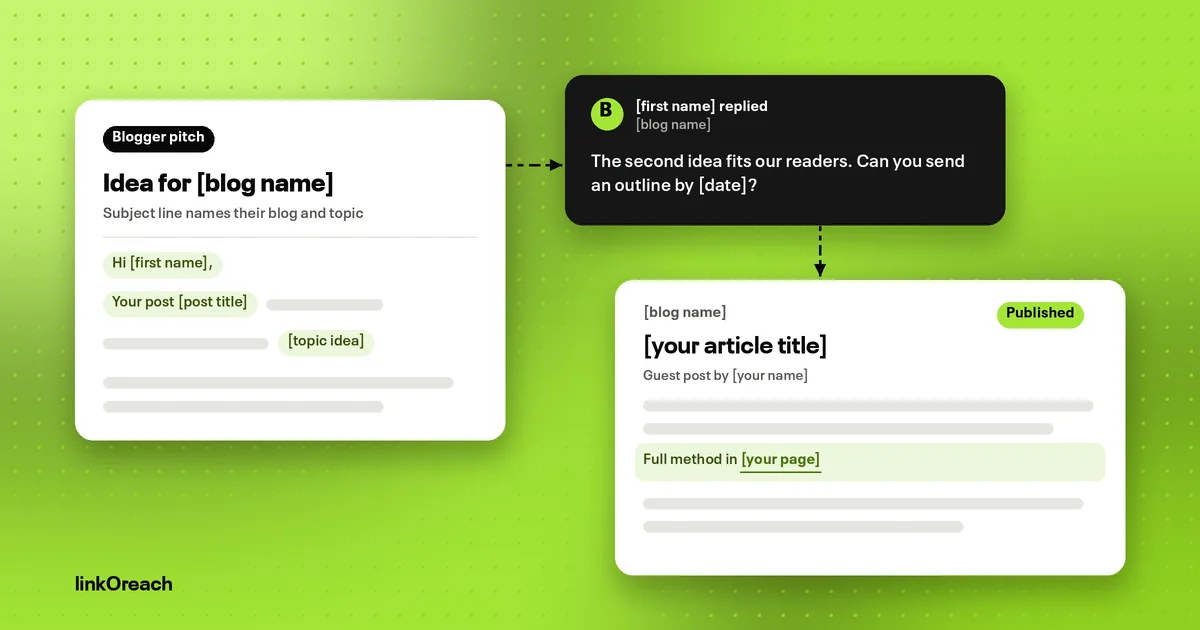
And a guest post pitch, where the subject names the proposed topic and the first sentence explains why it fits the site:
Subject: Article idea for [site name]: [topic]
Hi [first name],
I'm [your name], [your role] at [company]. Your recent "[recent article title]" covered [topic A]; a piece on [topic B] would pick up where it ends, for readers who [specific reader need].
Working title: "[proposed title]". It would cover [point one], [point two] and [point three], with [type of example or data] your readers can use. I can send an outline first if you prefer.
Would that fit your contributor guidelines?
[Your name]
[Title, company, URL]
Subject lines to stop using
Some subject lines cost replies; a few break rules that matter more than reply rates.
- "Re:" or "Fwd:" on a first email. Gmail's email sender guidelines tell senders not to start subject lines with Re: or Fwd: unless the message is a real reply or forward, and require subject lines and headers that accurately represent the message. An editor who finds no earlier thread knows the reply is fake, and the Report spam button is one click away.
- Subject lines that misdescribe the email. The FTC's CAN-SPAM compliance guide says the subject line must accurately reflect the content of the message, makes no exception for business-to-business email, and puts the penalty for each separate email in violation at up to $53,088. A subject that promises a "partnership" for an email asking for a paid link fails that test. This is not legal advice; if your outreach includes commercial offers, have someone qualified review your process.
- "Quick question" and other generic openers. "Quick question", "Collaboration opportunity", "Partnership inquiry" and "Hello from [company]" tell the editor nothing about their page.
- Urgency you invented. "Time sensitive", "Last chance" and deadlines on a link request read as pressure, and urgency words such as "now" and "ASAP" tend to pull open rates down rather than up.
- The recipient's name alone. "[First name]" as the full subject line is a mail merge trick editors recognize instantly.
- ALL CAPS, exclamation marks and emoji. None of them adds information, and each one makes the email look less like it came from a person. All caps did lift opens to 30% in the B2B data, against 25% for sentence case; we still avoid it, because a link request is judged on replies, and a shouted subject reads as a broadcast.
Subject line wording is also one of many signals inbox providers weigh, alongside authentication, complaint rates and sending volume. A clean subject line will not rescue a mailbox with a poor reputation; the authentication and warm-up for a new outreach domain come first.
Subject lines and Gmail's AI Inbox
Google announced on October 15, 2026 that Gmail's AI Inbox is rolling out to paid Google Workspace users, starting with US accounts in English. It pulls suggested to-dos out of email and summarizes the topics a user should catch up on. Editors whose company mail runs on Workspace will increasingly meet a pitch first as a line in a summary rather than as a subject in a list.
The early evidence on what those summaries keep comes from a BuzzStream and Aira study of Gemini summaries of PR pitches: subject line wording overlapped with 38.6% of summaries, and 81% of keyword matches came from the first two paragraphs. The practical rule follows from that. Write a subject line and an opening sentence that state the offer plainly, in words a summary could repeat without changing the meaning. Teaser subject lines and long warm-up paragraphs are the first things a summary drops.
How to test cold email subject lines on replies, not opens
Open rates are a poor way to judge a subject line. In Litmus's email client data, Apple Mail Privacy Protection affects roughly 55% to 60% of all opens, and those opens are not considered reliable. Open tracking also costs replies: sequences with tracking turned off averaged a 7.4% reply rate against 4.4% with it on. Judge subject lines on replies and live links, and turn tracking off.
Replies are a reliable measure but a slow one, because they are rare. To tell two subject lines apart with 95% confidence and 80% power, each variant needs hundreds or thousands of sends, depending on your baseline reply rate and the size of the difference you hope to find.
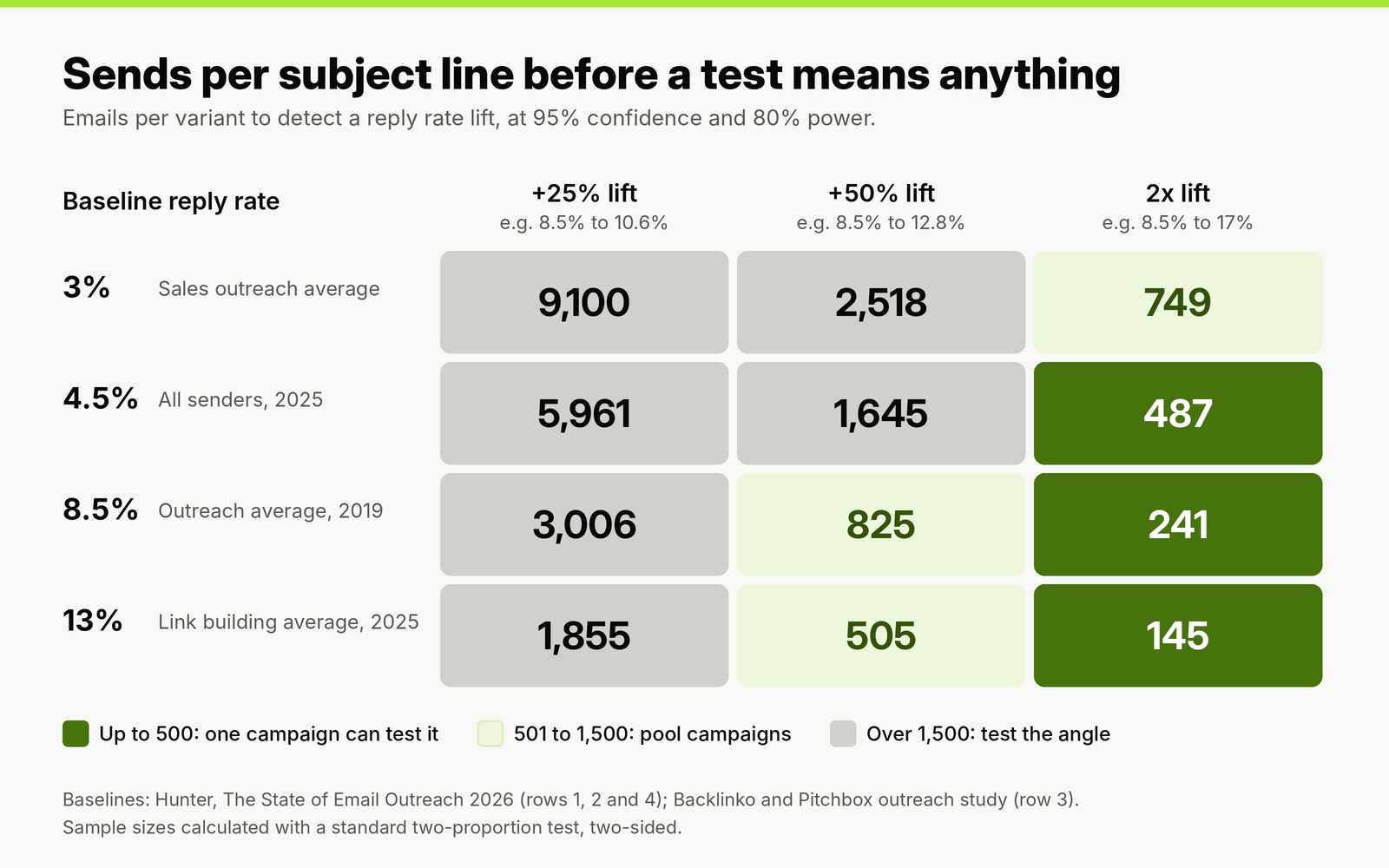
Small wording changes need thousands of sends to prove. Big changes in angle can show up within a single campaign.
Here is what that means for a typical campaign. Say you pitch 300 sites for niche edits and expect a reply rate near the 8.5% outreach average. Split 150 and 150, a subject line that doubled replies to 17% would need about 241 sends per variant to confirm, so even a dramatic winner would not be proven inside this campaign. A subject line that lifted replies by a quarter would need about 3,000 sends per variant, which is far more than one campaign sends.
So test in this order:
- Test the angle, not the wording. "Newer figure for your [topic] guide" against "Example for your [section] section" tests two different offers, and differences between offers are large enough to see. "Newer figure" against "Updated figure" is not.
- Change one thing. Keep the body, the send times and the prospect list identical, and split the list randomly before sending.
- Pool campaigns of the same type. Run the same two subject lines across three or four niche edit campaigns and add up the results before you decide.
- Count replies from people and live links, not auto-replies and not opens.
- Keep the winner as the new control and test the next angle against it.
Writing and testing subject lines in linkOreach
We built linkOreach for link building outreach, and Linkzy is the AI agent inside it. Linkzy writes a pitch for each site from the content on that site, so the subject line and the first sentence refer to the page being pitched rather than a mail merge field, and every email can be edited before it goes out. You can run two pitches head to head and let the better one take over, save the subject lines and templates that work and reuse them across campaigns, and send from your own Gmail, Outlook or SMTP mailbox. Reports show replies and live links per campaign, which is the measure that matters for subject line tests. Our pitch A/B testing and saved templates sit alongside prospecting, follow-ups and a shared inbox.
If you are testing subject lines on newsletters or promotional email to an opted-in list of thousands, pick an email marketing platform built for that. linkOreach is built for one-to-one link requests, not broadcast email.
Conclusion
Write cold email subject lines for link building in four to seven words that name the editor's page or topic and the thing you are offering, then make the first sentence of the email pay off that promise. Drop "Quick question", invented urgency, emoji and any "Re:" or "Fwd:" that is not a real reply; Gmail's guidelines and CAN-SPAM both expect the subject to describe the message.
Judge subject lines on replies and live links, not opens, and keep open tracking off. Most campaigns are too small to prove a wording change, so test different angles, pool results across campaigns of the same type, and keep the winner as your control.
If you want pitches written for each site and A/B tests judged on replies, start a free 7-day linkOreach trial and run your next subject line test on a live campaign.
Frequently Asked Questions
How long should a cold email subject line be?
Four to seven words for a link request. In large datasets, two to four word subject lines had the highest open rates, five to six words produced the best reply rates, and outreach emails with 36 to 50 characters got the best response. Four to seven words fits the page you mean and what you are offering, with the key words first so a phone screen does not cut them off.
What is a good subject line for a link building email?
One that names the recipient's page or topic and the specific thing you offer, such as "Newer figure for your [topic] guide" for a niche edit or "Broken link on your [page title]" for a broken link replacement. Make the first sentence of the email deliver what the subject promises.
Should you personalize cold email subject lines?
Yes, but personalize to the page rather than the person. Personalized subject lines raised replies from 3% to 7% in a study of 5.5 million B2B cold emails. For link requests, the article title or topic is the field that does the work; a first name on its own tells the editor nothing.
Is "Quick question" a good cold email subject line?
No. In 31 million emails sent in 2025, "Quick question" averaged 28.7% opens and a 2.5% reply rate, against 32.9% and 2.9% for other subject lines. It hides the ask, so editors read it as a sales email. A specific question about their page works better.
Can you use "Re:" in a cold email subject line?
Only when the email is a real reply, such as a follow-up sent in the same thread. Gmail's sender guidelines tell senders not to start subject lines with Re: or Fwd: unless the message is a real reply or forward, and US CAN-SPAM rules require subject lines that accurately reflect the message.
How do you A/B test cold email subject lines?
Test two different angles rather than two wordings, change nothing else, split the list randomly and judge on replies and live links, not opens. At a 13% baseline reply rate you need about 505 sends per variant to detect a 50% lift, so pool results across campaigns of the same type before you pick a winner.