Resource Page Link Building: Find, Vet and Pitch Lists
Resource page link building is getting your page listed on curated lists of links that other sites keep for their readers: a university library guide, a city's list of small business help, a "best tools for [task]" page, a "further reading" section at the end of a long guide. It works because these pages exist to link out, so you are not asking an editor to break a habit, only to add one useful entry or replace one that broke.
The catch is that most resource pages are old, many are abandoned, and the well-kept ones hear from link builders often. This guide covers what counts as a resource page, which assets get listed, the search queries that find them, how to decide which pages deserve an email, five templates to copy, a worked example for sizing a campaign and the rules on paid listings.
What counts as a resource page, and what does not
A resource page is any page whose main job is to point readers somewhere else. The useful kinds for link building fall into five groups:
- Topic lists: "[Topic] resources", "helpful links", "tools we recommend". Often on association, nonprofit and niche hobby sites.
- Library and course guides: subject guides kept by university librarians and course pages kept by instructors. Slow to answer, but they rarely ask for anything in return.
- Local and government lists: chamber of commerce pages, city small business pages, state agency resource lists.
- Further reading sections: a block of links at the end of an article or guide. Technically part of an article, but pitched the same way.
- Tool and template roundups: curated "best free [tool type]" pages that are updated rather than rewritten each year.
Two things look like resource pages and are not worth the email. Pages with hundreds of unrelated outbound links, sorted by nobody, are link farms. Pages that charge for a listing are directories selling links, which Google's policies treat as a problem (covered below). If a page lists a casino next to a pediatric dentist, close the tab.
Why resource pages still earn links
Every resource page decays. The pages it links to get moved, renamed, merged or deleted, and the list keeps pointing at them until someone notices. Pew Research Center tested about a million webpages collected between 2013 and 2023 and found that 25% of them no longer loaded, rising to 38% for pages from 2013.
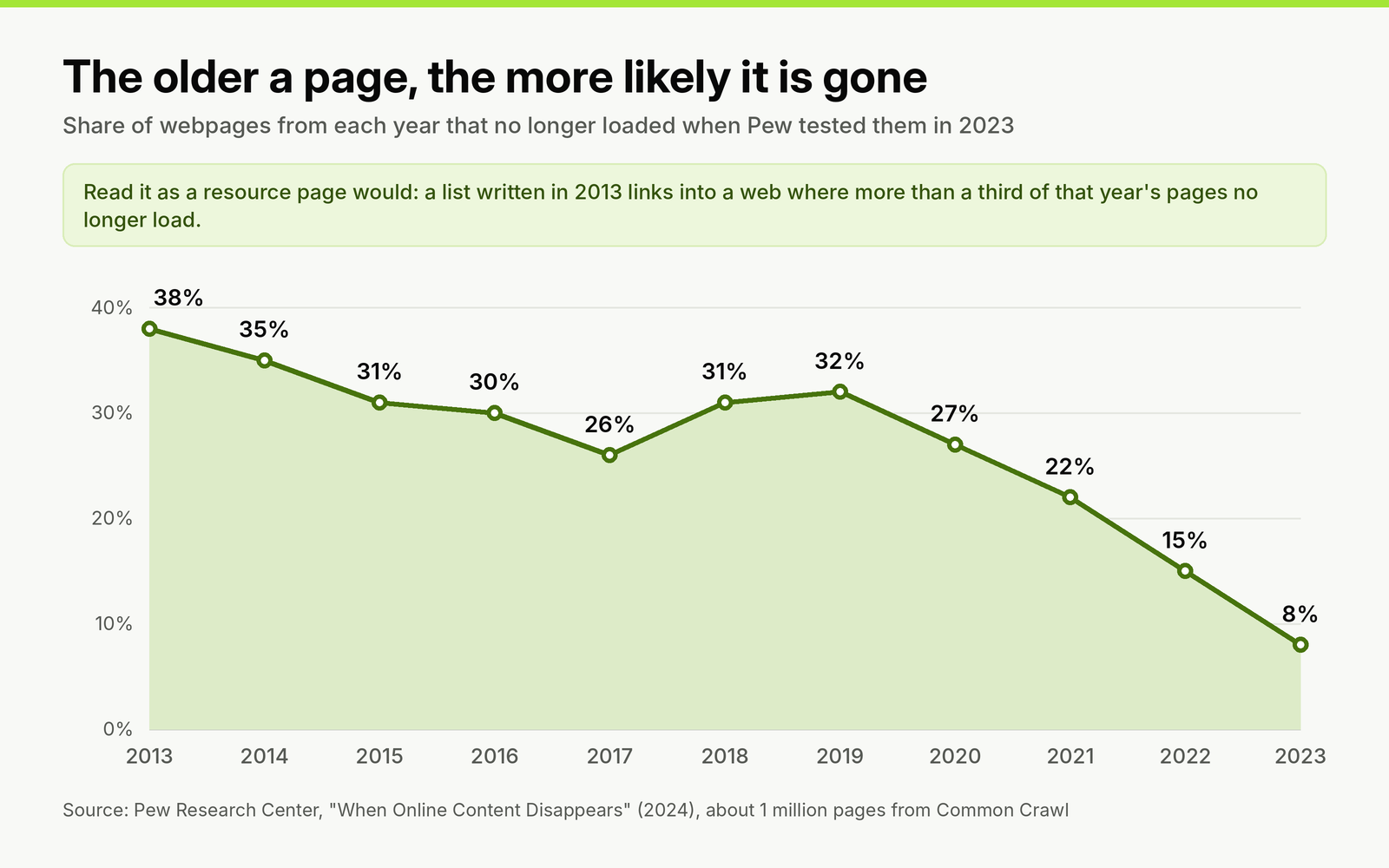
Pages from older years are far more likely to have disappeared. Resource lists written years ago point straight at that part of the web.
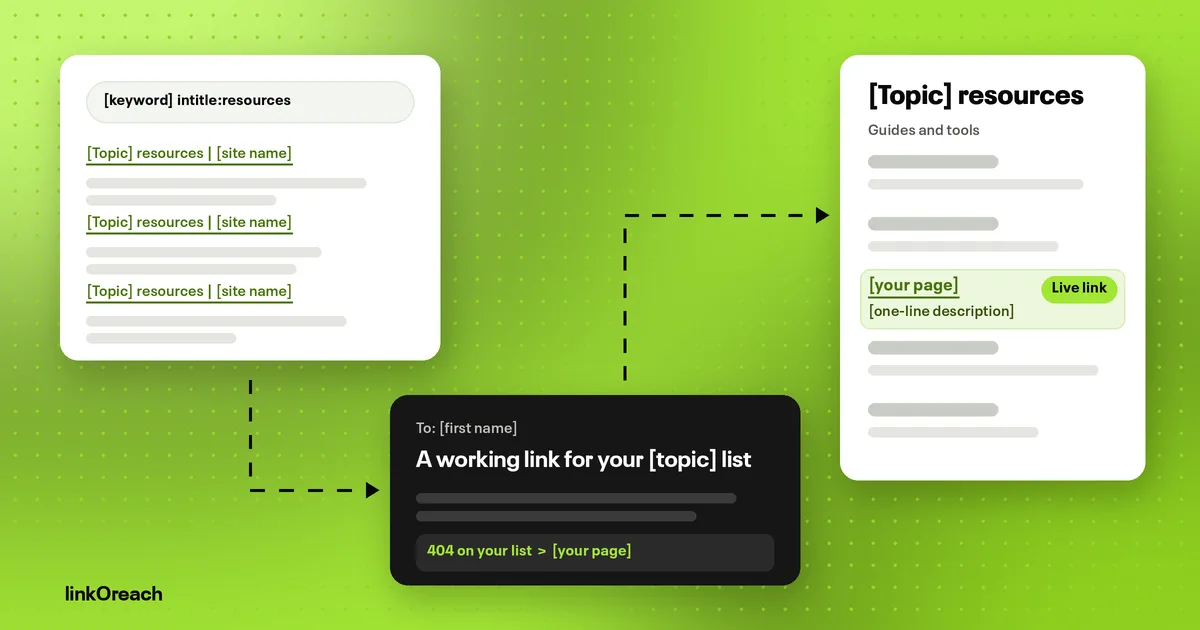
The same study found broken links on 21% of government pages and 23% of news pages it sampled, and at least one broken reference link on 54% of Wikipedia pages. A resource page is almost nothing but outbound links, so on any list that has gone a few years without an edit, expect dead entries. That changes the pitch. On an old list, the most useful thing you can bring the editor is not your page; it is the news that one of theirs is broken, with a replacement ready.
Resource pages also reward the same discipline as any link request. Across 31 million cold emails sent in 2025, Hunter's State of Email Outreach 2026 puts the average reply rate for digital PR and SEO link building at 13%, against 4.5% for all cold email. Small, specific asks are why link requests outperform sales email, and a request to add one line to a list is about as small as an ask gets.
What you need before you pitch
The asset decides the campaign. Resource page editors list things their readers can use without paying or signing up, so the page you pitch should meet four tests:
- Free and ungated. No email wall, no trial required to read it. A product page or a pricing page will not be listed.
- Specific. "A guide to [narrow task] with a worked example" beats "our blog". Match the level of the list: a beginner's library guide wants a plain explainer, a practitioner's list wants a template or a calculator.
- Stable. Editors are listing it because the old entry broke. If your URL changes in a site migration next year, you become the next dead link. Use the address you will keep.
- Better than what is there. Open the three entries nearest to where yours would go. If yours is not clearly more current, more complete or easier to use, choose a different asset or a different list.
Calculators, checklists, glossaries, datasets, free templates and evergreen how-to guides are what resource lists are made of. Opinion posts and news fit badly, because they date.
How to find resource pages
Start with search operators, then widen with backlink data. Replace [keyword] with the topic of your asset, not your brand or product category, and try two or three variants of it.
| Query | What it tends to find | Noise to filter out |
|---|---|---|
| [keyword] intitle:resources | Dedicated topic lists | Vendor "resources" hubs that only list their own content |
| [keyword] inurl:resources | Resource sections on association and nonprofit sites | Blog category archives |
| [keyword] intitle:"useful links" OR intitle:"helpful links" | Older hand-kept lists, often with dead entries | Pages nobody has edited in years |
| [keyword] "further reading" | Further reading sections at the end of guides | Footnote lists in academic papers |
| [keyword] site:.edu "resources" OR "guide" | Library subject guides and course pages | Student project pages and PDFs |
| [keyword] site:.gov intitle:resources | Agency and local government lists | Documents with no editor named |
| [keyword] "tools we recommend" OR "recommended tools" | Curated tool roundups on practitioner blogs | Affiliate pages that list whoever pays commission |
Add -filetype:pdf to cut documents, and a city or state name for local lists. Then use backlink data: pull the backlinks of two or three competitors whose free guides cover the same topic and filter the referring pages for "resources", "links" or "tools" in the URL or title. Any page that lists a competitor's guide already accepts entries of that type, which makes it a better prospect than a page you found by keyword alone.
How to decide which pages to pitch
Most of the time in a resource page campaign goes into vetting, and it should. Run every candidate through these checks before it goes on the list:
- [ ] The page is indexed: search site: plus its URL and see it come back.
- [ ] It lists between roughly 10 and 100 entries, grouped by someone who read them.
- [ ] There is a section where your page belongs without stretching the topic.
- [ ] It shows signs of upkeep: a recent update date, entries newer than a year, or a named editor.
- [ ] Click every link in your target section and note any that return 404, redirect to a home page or land on a parked domain.
- [ ] No listing fee, no "link back to us first", no sponsored section mixed into the list.
- [ ] You can find a named person who maintains it, or a submission form.
Two of those checks matter more than the rest: how well your page fits, and whether anyone still looks after the list. Plot each page on those two questions and the pitch writes itself.
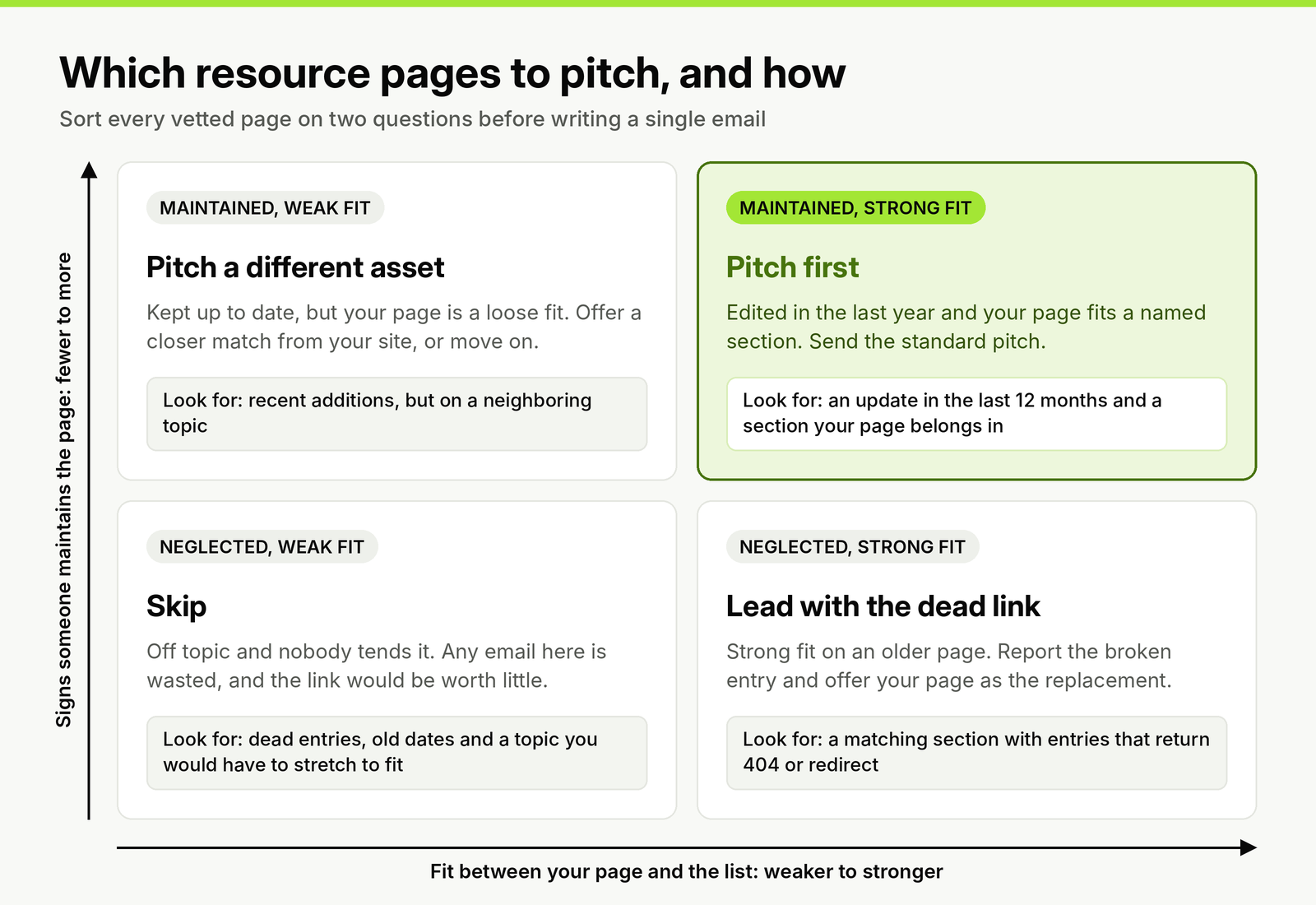
Fit and upkeep decide both whether to email and what to lead with. The neglected but relevant pages are where a broken link gives you a reason to write.
Domain Rating and traffic still matter for deciding which pages are worth the time, but treat them as a tiebreaker. A library guide on a modest domain, read by the exact audience your guide serves, is a better link than an unrelated "resources" page on a strong one.
Finding the person who maintains the list
Resource pages are rarely kept by the site's marketing team, so generic SEO contact rules do not apply. Look in this order:
- A name on the page: "maintained by", "compiled by" or a librarian's profile box on a library guide. That person is your contact.
- A submission route: "suggest a resource" links or forms. Use it, even if you also find an email; editors who publish a form expect requests there.
- The section owner: on association and government sites, the staff page for the program the list belongs to.
- The general editor or webmaster: last resort, and say in one line which page you mean.
Write to one person per site. If they do not answer, wait at least 30 days before trying a colleague, and say plainly that you wrote to someone else first.
Resource page link building templates
Replace every bracketed placeholder with details from the page itself. Each template starts with its subject line; keep the email in plain text with one link to your page.
1. Suggest an addition to a maintained list
Use for pages in the "pitch first" group: updated recently, with a section your page fits.
Subject: A resource for the [section name] section of your [topic] list
Hi [first name],
I'm [your name], [role] at [company]. I came across your [topic] resources page while researching [specific task your page helps with].
We publish [asset name], a free [guide, calculator or template] that [what it does in one sentence]. It could sit in your [section name] section next to [an existing entry], since it covers [what the existing entry does not].
Here it is if you'd like to look: [URL]. If it isn't a fit for the list, no reply needed.
[Your name]
[Title, company, URL]
2. Report a broken entry and offer a replacement
Use for neglected but relevant pages, when an entry in your target section is dead.
Subject: Broken link on your [topic] resources page
Hi [first name],
I was using your [topic] resources page and noticed that the link to "[title of dead entry]" in the [section name] section now [returns a 404, or redirects to an unrelated page].
If you're looking for a replacement, our [asset name] covers the same ground: [one sentence on what it covers]. It's free to read and has no sign-up: [URL].
Either way, I thought you'd want to know about the broken link.
[Your name]
[Title, company, URL]
The report has to be useful on its own. If the editor fixes the link with a different resource, you have still done them a favor, and that is what keeps a broken link email from reading as a trick.
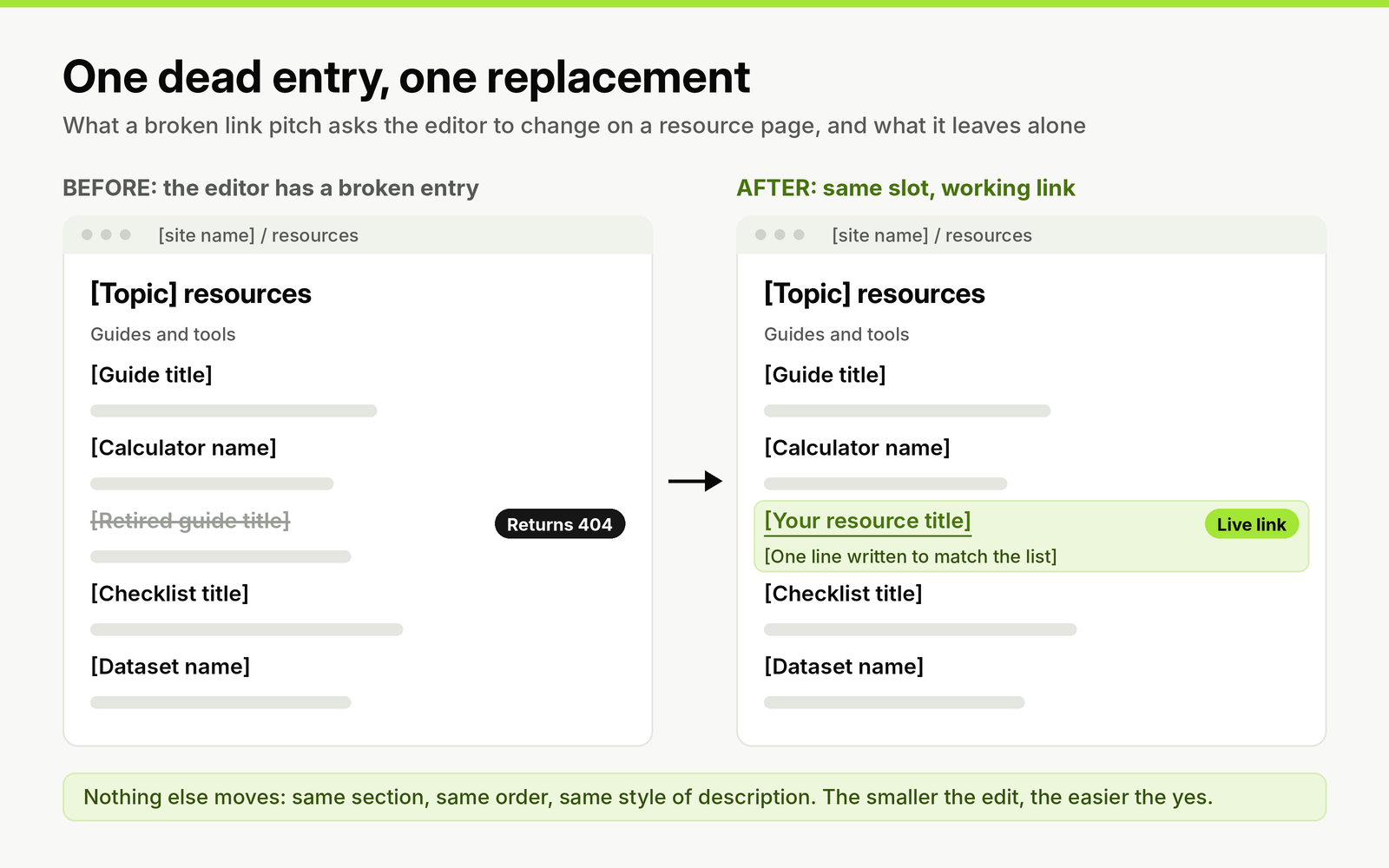
The edit you are asking for: one entry swapped in the same slot. Write your one-line description in the style of the list so the editor can paste it.
3. Write to a librarian or course instructor
Use for university library guides and course pages. Drop marketing language; librarians judge sources, not pitches.
Subject: Suggested source for your [subject] guide
Hi [first name],
I work on [asset name] at [organization], a free [type of resource] on [topic]. It is written for [audience level, such as undergraduates new to the subject] and cites [main sources or method in one line].
I thought it might suit the [tab or section name] part of your [subject] guide, alongside [existing entry]. The link is [URL], and it stays free and ungated.
Thank you for considering it.
[Your name]
[Title, organization]
4. Text for a "suggest a resource" form
Use when the page offers a submission form. Forms often cap length, so keep it to what the editor needs to decide.
Subject: Suggestion: [asset name]
Suggested section: [section name].
[Asset name] ([URL]) is a free [type of resource] that [what it does in one sentence]. It is written for [audience] and updated [how often].
Suggested description for the list: "[one line in the style the list already uses]".
[Your name], [company]
5. Follow-up that adds something
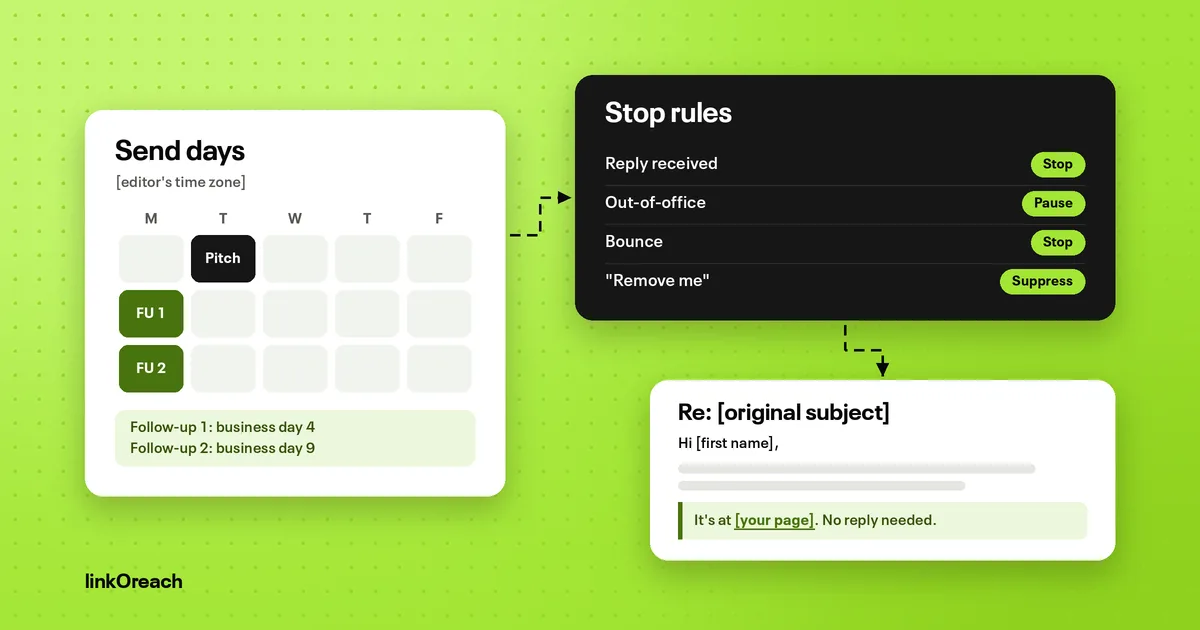
Use once, three to four business days after template 1 or 2, in the same thread.
Subject: Re: [original subject]
Hi [first name],
One more thing I noticed while on the page: [a second dead entry, or a detail about how readers use your asset that fits the list's audience].
If it's easier, here is a line you could paste in the [section name] section: "[asset name]: [one-line description]". Happy to leave it there if the list is closed to new entries.
[Your name]
Stop after one follow-up for resource pages. Lists are maintained in batches, sometimes once a semester, so a quiet editor may simply not have opened the page yet. First pitches on other campaign types, such as niche edits, guest posts and listicles, follow the cold email templates for link building. Other stalled situations a sequence cannot handle need their own follow-up email templates.
Worked example: sizing a resource page campaign
An in-house SEO has a free [industry] calculator and wants it on resource pages. Here is how the numbers run; the candidate and vetting counts are assumptions to replace with your own.
- Candidates: say seven operator queries across three keyword variants, plus competitor backlinks, give about 400 URLs once duplicates are removed.
- After vetting: suppose 120 pass every check: 60 maintained with a strong fit, 35 neglected with a dead entry in the right section, and 25 maintained with a weaker fit that get a different asset from the site.
- Emails: 120 first emails plus up to 120 follow-ups is at most 240 messages. Spread over three weeks of weekdays, that is about 16 a day, which one outreach mailbox carries easily.
- Replies to plan for: at the 13% link building average, about 16 replies. Some will be "added it", some "not adding new entries", and some will ask for a fee.
- Measure: live links divided by pages contacted, per group. After one campaign you will know whether your dead-link group or your maintained group converts better for this asset, and you can weight the next list that way.
Two things follow. Vetting time dwarfs writing time, so the cost of a campaign is mostly the hours spent clicking through lists. And the volume is low enough that a new outreach domain can run it while it builds a sending history, within the volume limits that cold email deliverability sets.
Paid listings, link swaps and other rules
Some resource page owners will reply with a price or a condition. Google's spam policies treat both as link schemes: they list "exchanging money for links", "exchanging goods or services for links" and "excessive link exchanges" or partner pages "exclusively for the sake of cross-linking" as link spam, along with low-quality directory links. A paid listing is acceptable only when the link carries rel="sponsored" or rel="nofollow".
None of these options is risk free, so decide your policy before the campaign starts:
- Listing fee: decline, or accept only with rel="sponsored", and record it as a paid placement.
- "Link to us and we'll list you": one relevant mutual mention between two sites that cover the same topic is ordinary; a resource page built on swaps is the pattern the policy names.
- Free product or account in exchange for a listing: Google lists this as an exchange too. Offer access so the editor can judge the tool, never as payment for the link.
- rel="nofollow" already on the list: some library and government lists mark every outbound link this way. The link can still send readers, so decide whether that traffic is worth the email before you pitch.
Tracking placements after the yes
Some editors reply "will add it" and update the page weeks later, in a batch. Check the page 14 days after a yes, then about three months later; entries get reordered, and lists get rebuilt. If an editor has not added it after 30 days, one short note restating the section and the one-line description is enough. Agencies placing links like this for several clients usually outgrow a spreadsheet at this stage, and BuildLinks is built for tracking placements, client reporting and invoicing after links are agreed.
Resource pages are one campaign type among several. They fit alongside niche edits, guest posts and unlinked mentions in a full link building outreach campaign. PR, podcast and partnership work sits around link building as part of wider outreach marketing.
Running resource page outreach in linkOreach
We built linkOreach for link building outreach, and Linkzy is the AI agent inside it. For resource pages, the most useful part is backlink analysis: enter up to five competitor domains and it lists every site linking to them but not to you, ranked by DR and traffic, which surfaces the lists that already include a competitor's guide. Tick the ones worth chasing and they go straight into a campaign. Linkzy can also build a prospect list from your keywords, DR range, traffic floor and location using Ahrefs data, check each address before anything sends, write a pitch for each site that you edit first, and run follow-ups that stop when someone replies. Replies land in a shared inbox, and each thread is tracked through to a live, indexed backlink. The linkOreach feature set covers the rest.
One limit to know: Linkzy looks for the SEO lead first, then content marketing, then the CMO. That order suits company blogs, not library guides or government lists, so on those pages check who it picked before you approve the email, or run them in manual mode. We currently offer one plan at $49 a month, an introductory price, with 500 email credits, 5,000 searches and 100,000 Ahrefs credits, and a 7-day trial with no credit card; the plan and its email credits are on our pricing page.
Pick something else if your resource page work is a few dozen hand-picked library guides a quarter. A spreadsheet and your own mailbox are enough at that size.
Conclusion
Pitch resource pages with an asset that is free, specific, stable and better than the entries beside it. Find lists with operator searches and competitors' backlinks, then vet hard: indexed, 10 to 100 curated entries, a section you fit, signs of upkeep, no fees and a named maintainer. Sort pages by fit and upkeep, lead with a dead entry where the list is neglected, and send one pitch plus one follow-up that adds something.
Plan around a 13% reply rate, decline or mark paid listings as sponsored, and check every yes at 14 days and three months.
If you want competitor gap analysis, pitches and follow-ups in one place, start a free 7-day linkOreach trial and build your first resource page list this week.
Frequently Asked Questions
What is resource page link building?
It is getting your page added to curated lists of links that other sites keep for their readers, such as topic resource pages, university library guides, local government lists and "further reading" sections. You find relevant lists, check they are maintained and that your page fits a section, then email the person who keeps the list.
How do you find resource pages for link building?
Combine your topic with search operators such as [keyword] intitle:resources, [keyword] inurl:resources, [keyword] "further reading" and [keyword] site:.edu "resources". Then check competitors' backlinks for referring pages with "resources", "links" or "tools" in the URL or title: lists that already include a competitor's guide accept entries of that type.
Is resource page link building still worth it?
Yes, for assets that are free, specific and stable, such as calculators, templates and evergreen guides. Resource pages decay: Pew Research Center found that 38% of webpages from 2013 no longer loaded a decade later, so older lists often have dead entries you can offer to replace.
Should I pay to be listed on a resource page?
Google's spam policies treat exchanging money, goods or services for links as link spam unless the link carries rel="sponsored" or rel="nofollow". Decline listing fees, or accept them only with rel="sponsored" and record them as paid placements.
What should a resource page outreach email say?
Who you are, which page and section you mean, what your resource does in one sentence, why it fits next to the existing entries, and an easy way to say no. If an entry in that section is broken, lead with that and offer your page as the replacement.
How many follow-ups should I send to a resource page owner?
One, three to four business days after the first email, in the same thread, adding something new such as a second dead entry or a paste-ready description. Many lists are updated in batches, so check back on any yes after 14 days rather than sending more reminders.