Email Deliverability Tools for Outreach: 9 Free and Paid Picks
The email deliverability tools most link builders need are free: Google Postmaster Tools, a DMARC report digest, an authentication and blocklist checker, and Validity's Heatwave lookup, plus a verifier for addresses your outreach tool does not already check. Pay for seed-based inbox placement tests only when replies fall at one mailbox provider and the free tools cannot explain why.
Most roundups of email deliverability tools are written for marketers sending newsletters to tens of thousands of subscribers. Outreach senders work at 20 to 60 emails a day per mailbox, mostly to editors on company domains, and at that volume several well-known tools show little or nothing. Below, the tools are sorted by the job they do, priced from each vendor's own page, and judged on what they can and cannot see for a link building campaign. Then comes a decision path for the day replies drop, a monitoring routine and a worked cost example for an agency.
What email deliverability tools do
Every deliverability tool reads one part of an email's path from your outreach domain to an editor's inbox, and none reads all of it. DNS checkers look at your own records: SPF, DKIM, DMARC and the reverse DNS of the sending server. DMARC report readers summarize what receiving servers report back about mail that claims to come from your domain. Mailbox provider dashboards show what Gmail or Outlook.com decided about your mail, but only for their own users. Blocklist lookups show whether your domain or sending IP is on a list that filters consult. Seed tests send your message to mailboxes the vendor controls and report whether it landed in the inbox or spam. Verifiers act before any of that, by removing addresses that would bounce.
For outreach senders, the gaps matter as much as the coverage. The receiving end of a link request is usually a company mailbox on Google Workspace or Microsoft 365, and most of the dashboards built by mailbox providers count only their consumer users. The map below shows where each tool reads and which part of the path no tool sees.
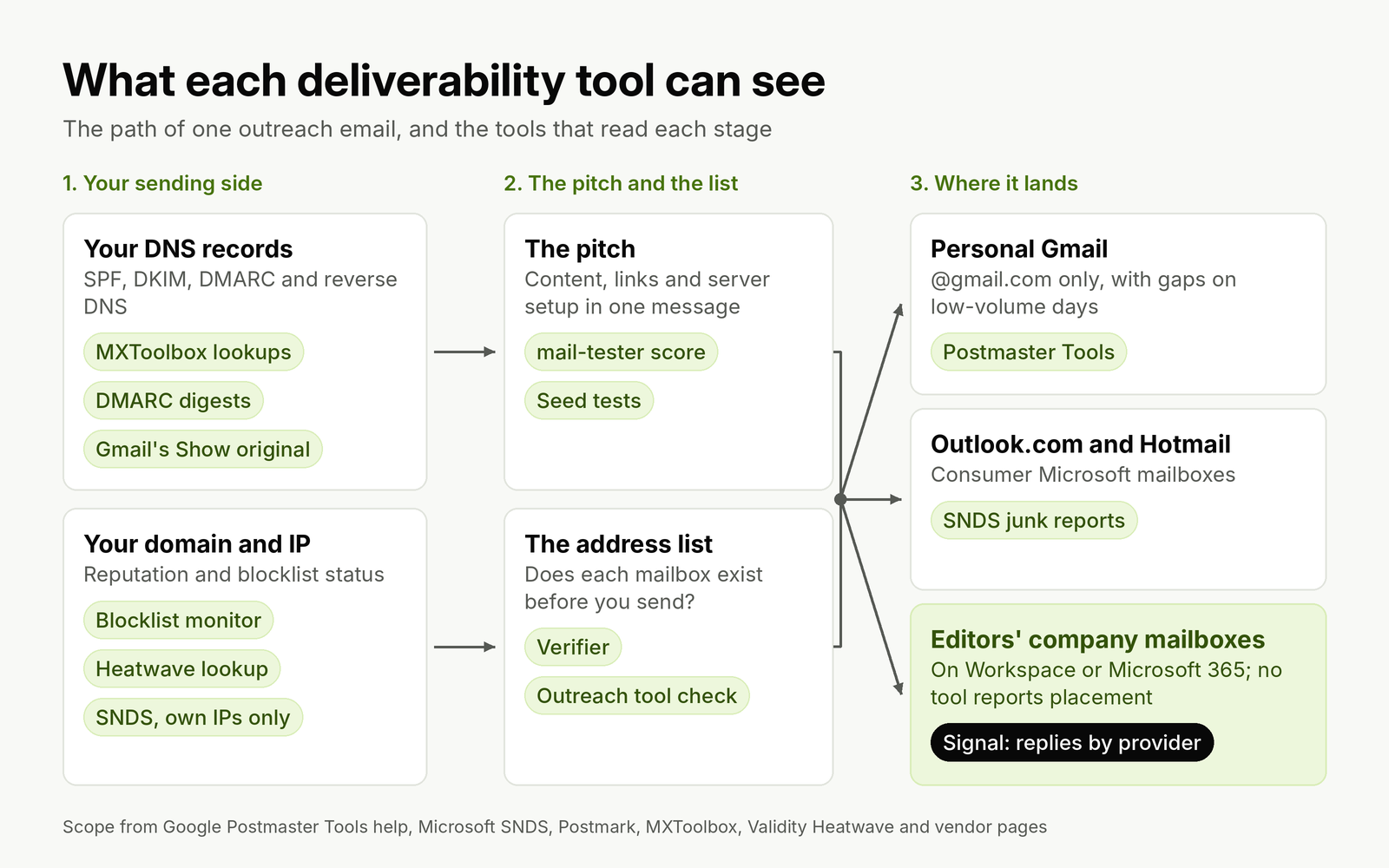
No tool reports where a pitch landed in an editor's company mailbox. Replies by recipient provider are the only signal from that part of the path.
Email deliverability tools compared
Prices and free tiers below come from each vendor's own pricing or product page. "Paid entry" is the cheapest plan that includes the tool's main job.
| Tool | Job | Free tier | Paid entry | Worth it for outreach senders when |
|---|---|---|---|---|
| Google Postmaster Tools | Gmail spam rate, compliance status, delivery errors | Free | No paid plan | You send enough to personal Gmail addresses for data to appear |
| Microsoft SNDS | IP reputation and junk reports at Outlook.com | Free | No paid plan | You control the IP addresses your mail leaves from |
| MXToolbox | DNS and authentication lookups, blocklist monitoring | Lookups, plus one monitor covering the top 30 blacklists | Delivery Center; no price on its plans page | Always, for setup checks and a standing blocklist monitor |
| Postmark DMARC digests | Weekly summary of DMARC aggregate reports | Weekly digest email | Paid monitoring after a 14-day trial | From the first day on every outreach domain |
| Validity Heatwave lookup | Blocklist for synthetic warming and cold outreach domains | Free lookup | No paid plan | Monthly, and whenever replies drop |
| mail-tester.com | Spam score for one message: content, formatting and server setup | Single tests | Monthly subscriptions with fixed test quotas | Before a new template or a new mailbox goes live |
| GlockApps | Seed list inbox placement tests, DMARC analytics | 2 spam test credits, 10,000 DMARC messages | Essential, $59 a month billed annually ($708 a year), 360 spam test credits | Replies fall at one provider and the free tools find nothing |
| MailReach | Warm-up network plus spam tests | None | $19.50 per mailbox a month, with at least 20 spam test credits | Rarely; see the Heatwave section below |
| ZeroBounce | Address verification, plus one inbox and one server test | 100 validations a month, 1 inbox test, 1 blacklist monitor | $39 for 2,000 validations pay as you go, or $99 a month | Your outreach tool does not verify addresses before sending |
Five of the nine cost nothing, and the free tiers of two paid tools cover an occasional test. A link builder running one outreach domain can build a complete monitoring setup without a deliverability subscription; the paid tools earn their place in specific situations, covered below.
Free tools that cover most outreach senders
Google Postmaster Tools: useful, with two blind spots
Postmaster Tools is the only place Gmail tells you what it thinks of your mail, and the requirement that matters most is set there: Google's email sender guidelines require every sender to keep the spam rate reported in Postmaster Tools below 0.3%. Version 2 adds a Compliance status dashboard that checks your domain against those guidelines. Google has postponed retiring the old interface, but its transition notice says the Domain and IP Reputation dashboards will not carry over to v2, so set up the new version and stop relying on a reputation color.
The blind spots are specific to outreach. The dashboards cover mail sent to personal Gmail accounts, the addresses ending in @gmail.com or @googlemail.com, and an editor at a company domain hosted on Google Workspace is not counted. Google also says dashboards might not include all data on days when your volume is low, to protect user privacy. A mailbox sending 40 pitches a day, mostly to company domains, will often see empty charts. That is normal, not a fault. Verify the domain anyway: the day a campaign lands on a list heavy with Gmail addresses, the spam rate will show, and a single complaint at that volume is a large share of the day.
Microsoft SNDS: only if you own the sending IPs
Microsoft is the provider outreach senders most need data on. Validity's 2026 Email Deliverability Benchmark put Microsoft's average inbox placement at 77.4% in 2025, with 15.1% landing in spam, the weakest of the major providers. SNDS is Microsoft's free reputation portal, but it reports on individual IP addresses, and you request access to the IPs you are responsible for. If you send from Google Workspace, Microsoft 365 or an outreach tool's shared servers, you do not control those IPs and have nothing to register. SNDS is worth the setup only for teams that run their own mail servers. Microsoft has also moved SNDS to a new portal, and network access now expires 10 months after approval, so put a reminder in the calendar if you use it.
Without SNDS, the practical substitute is your own data: tag each prospect by the provider that hosts its mail (the MX record shows Google or Microsoft) and compare reply rates by provider every week.
Authentication checks: MXToolbox and Gmail's "Show original"
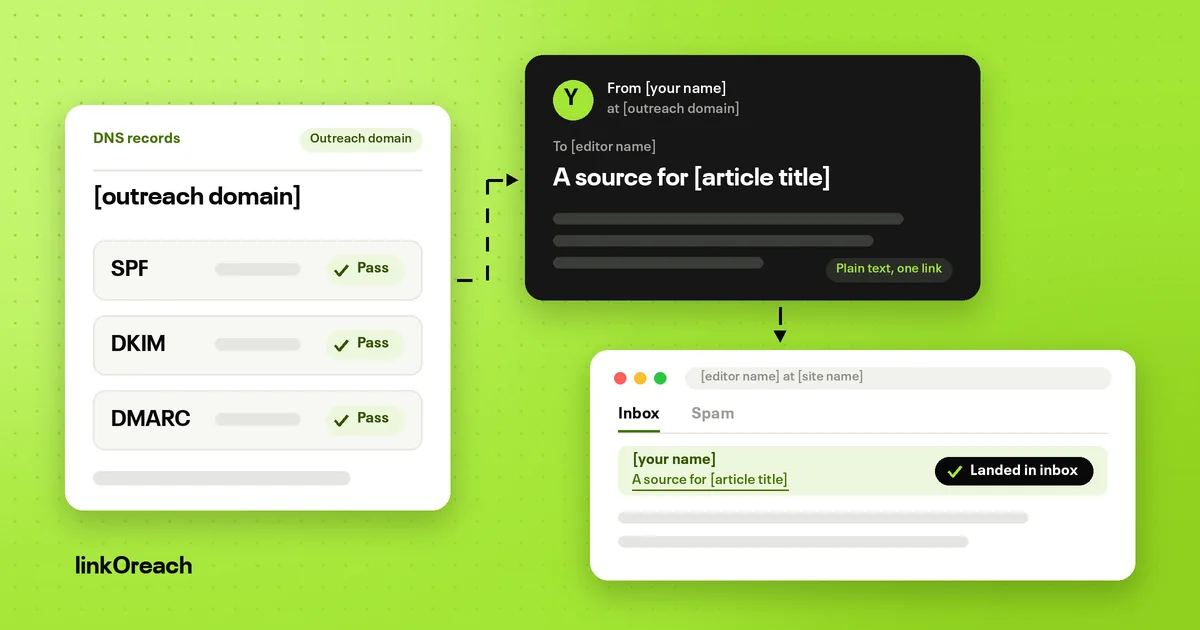
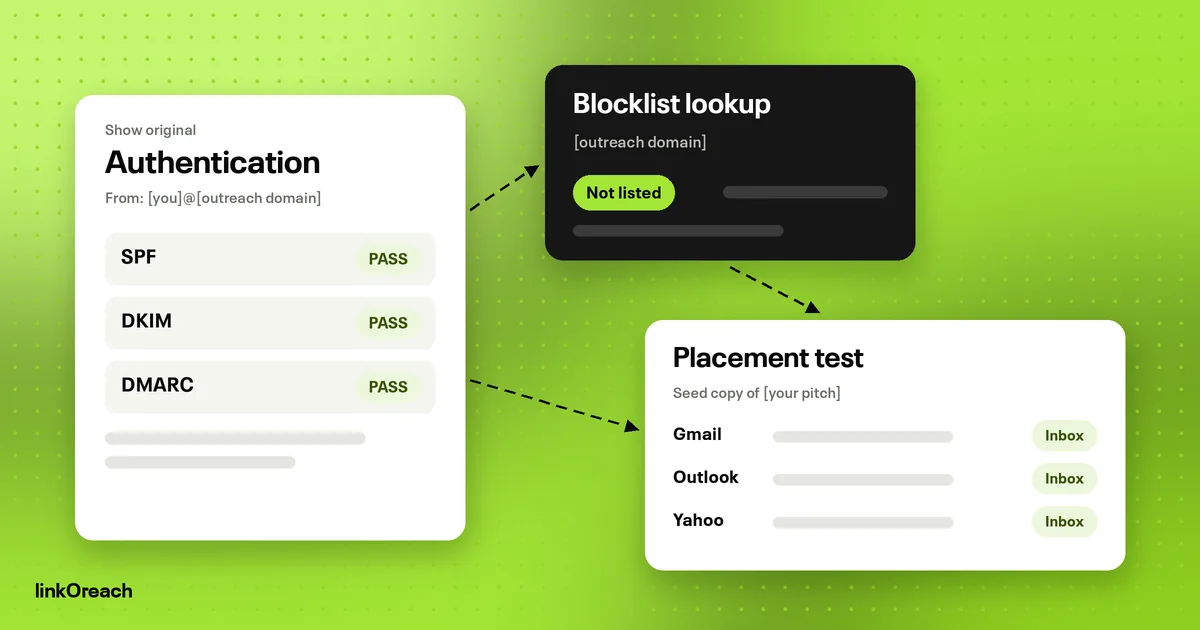
Two free checks catch most setup errors. MXToolbox's lookups read your SPF, DKIM and DMARC records and flag syntax problems, such as two SPF records on one domain. Then send a real pitch to a personal Gmail address and open "Show original": SPF, DKIM and DMARC should each read PASS, and the DKIM domain should match the From domain. The record lookup tells you what you published; the Gmail header tells you what a receiver concluded. Run both after any change to your mailbox provider or sending tool, because a new tool that relays mail needs its own entry in SPF and its own DKIM key.
DMARC digests: reports a person will read
DMARC aggregate reports arrive as XML files that nobody reads. Postmark's free service processes them and sends a weekly summary of who is sending mail as your domain and whether it aligned. Setup is one DNS change: a DMARC record at p=none with a reporting address that points to Postmark. Yahoo's sender requirements strongly recommend the reporting tag during initial setup so you can monitor what passes. Read two to four weekly digests, confirm your mailbox provider and outreach tool both align, then tighten the policy. GlockApps' free tier also processes up to 10,000 DMARC messages a month, which covers an outreach domain many times over.
Blocklists and Heatwave
MXToolbox's free monitor watches one domain or IP against the top 30 blacklists and emails you when it is listed. Add Validity's Heatwave lookup to the same monthly check. Heatwave is a domain blocklist aimed at cold email infrastructure: its listing policy says it lists domains used for synthetic reputation warming and the active cold outreach campaigns that follow. Warming listings are permanent records that do not expire because the activity stopped; removal requires a review showing the listing was wrong. For an outreach domain, a clean Heatwave result is worth checking before every new campaign, and a listing is a reason to stop and retire the domain rather than send through it.
Inbox placement tests: when paying makes sense
A seed test sends your message to a list of mailboxes the vendor controls at Gmail, Outlook.com, Yahoo and others, then reports where each copy landed. It is the only way to see the spam folder directly. For outreach, read the result with three limits in mind.
- Seeds are mostly consumer mailboxes. An editor's company filter, often with extra security rules from their IT team, is not in the seed list.
- Seeds never reply. Mailbox providers weigh how recipients treat your mail, and a seed account has no history with you.
- One test is one sample. A single spam result can come from that day's filtering rather than from your setup. Repeat before acting on it.
With those limits, placement tests answer two questions well. First, does a new template or new mailbox land in spam at a major provider before you send it to 300 editors? Second, when replies from Microsoft-hosted domains fall while Google-hosted replies hold, is the cause placement or the list? GlockApps' Essential plan at $708 a year is the entry point for regular testing; its free tier's two credits and ZeroBounce's free monthly inbox test cover a one-off check. mail-tester.com sits a step earlier: it scores one message for content, formatting and server problems, which catches a broken DKIM signature or a link shortener before any seed test does.
Test the message you will send, from the mailbox that will send it, with the same link and signature. A test from a different mailbox or a cleaned-up copy of the pitch measures something else.
Warm-up tools after Heatwave
Warm-up tools such as MailReach connect your mailbox to a network of others that open your messages, reply and move them out of spam, building reputation before real sending starts. MailReach charges $19.50 per mailbox a month, which includes at least 20 spam test credits and warm-up of up to 100 emails a day.
The Heatwave listing policy changes the trade for link builders. It defines synthetic reputation warming as automated exchanges between controlled mailboxes intended to manufacture reputation before outreach begins, and it treats a confirmed warming observation as permanent. Outreach volume is low enough to warm a new mailbox with real pitches, starting at about 5 a day and reaching 20 to 40 by the fourth week, the same ramp we use when setting up an outreach domain so pitches reach the inbox. A warm-up network adds a lasting blocklist risk to solve a problem most outreach senders do not have. If a sending tool turns warm-up on by default, switch it off; several of the tools that replace lemlist for link building include it on entry plans.
Verification tools
Verification is the one deliverability job outreach senders cannot skip, because hard bounces are the clearest sign to a mailbox provider that you send to addresses you never checked. ZeroBounce's free plan refills 100 validations a month, enough for a small campaign; above that, $39 buys 2,000 validations pay as you go, and its subscription starts at $99 a month. Verify each address when it enters a sequence and again if it has waited more than three months.
Before paying, check what your outreach tool already does. Many outreach platforms verify addresses as part of finding the contact, and paying a second verifier to check the same list adds cost and nothing else. Catch-all domains are the exception every verifier shares: when a domain accepts every address, no tool can confirm a single mailbox exists, so send to catch-all addresses only when the contact is the named author of the page you are pitching.
Which tool to open when replies drop
A fall in replies is the symptom outreach senders see first, and the order you check things in decides how long the problem lasts. Start with what costs nothing and takes minutes: bounce messages and authentication. Move to blocklists, then to your own data split by provider, and pay for a placement test only when the cheaper checks come back clean.
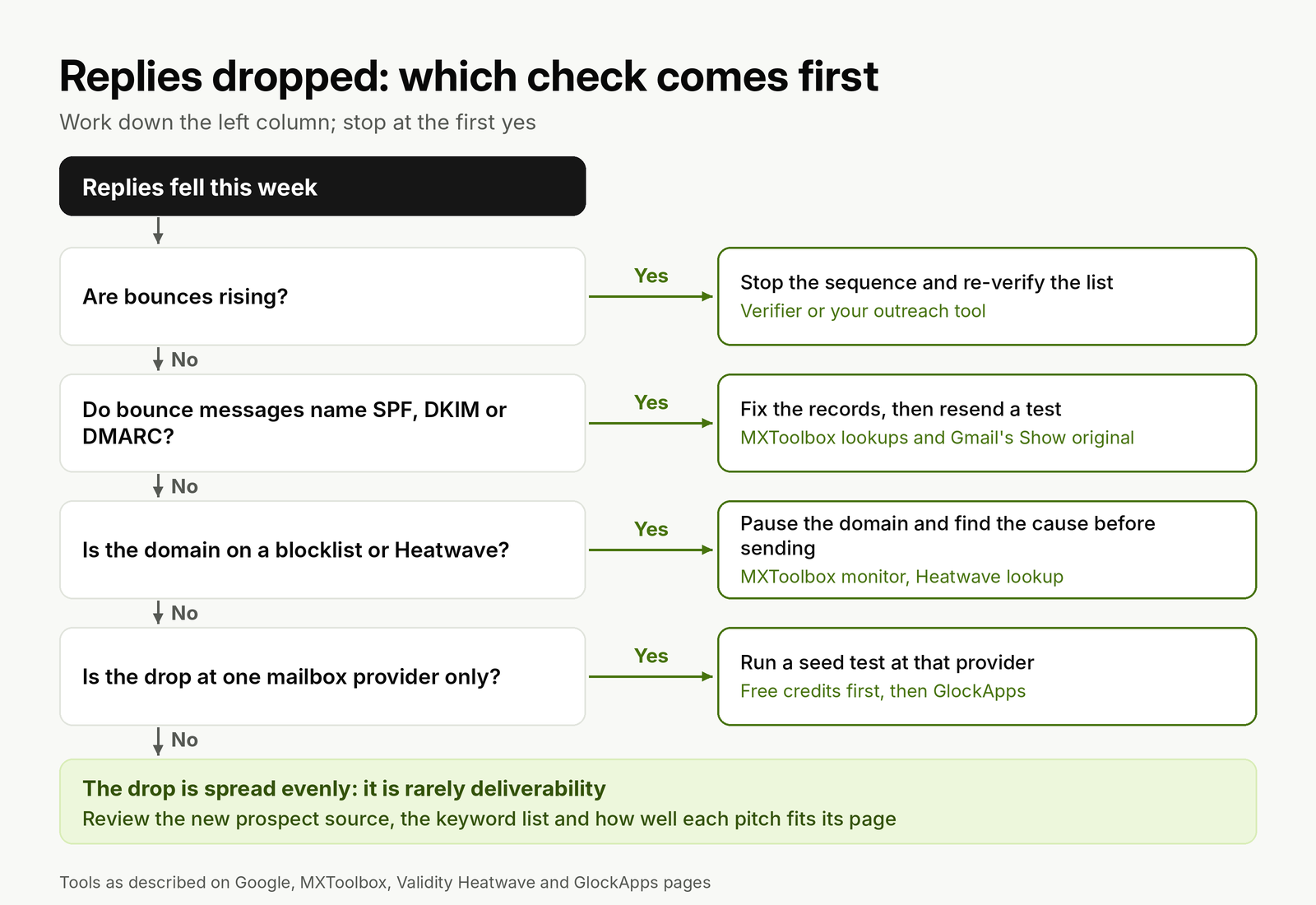
Most reply drops end at the first or last branch: a bad list or a weak pitch. Placement tests sit in the middle, for the cases the free checks cannot explain.
The last branch matters more than it looks. When replies fall evenly at Google and Microsoft domains while bounces, authentication and blocklists are clean, the cause is rarely deliverability. It is usually a new prospect source, a broader keyword list or a pitch that stopped matching the pages it was sent to. Spam complaints are the exception, and the complaint math behind a two-follow-up sequence shows how few it takes at outreach volume.
A monitoring routine for one outreach domain
The tools are cheap; the habit is the hard part. Tie each check to an event you already have: a new domain, a new campaign, the weekly review. The timeline shows the routine we use for one outreach domain, from setup through steady sending.
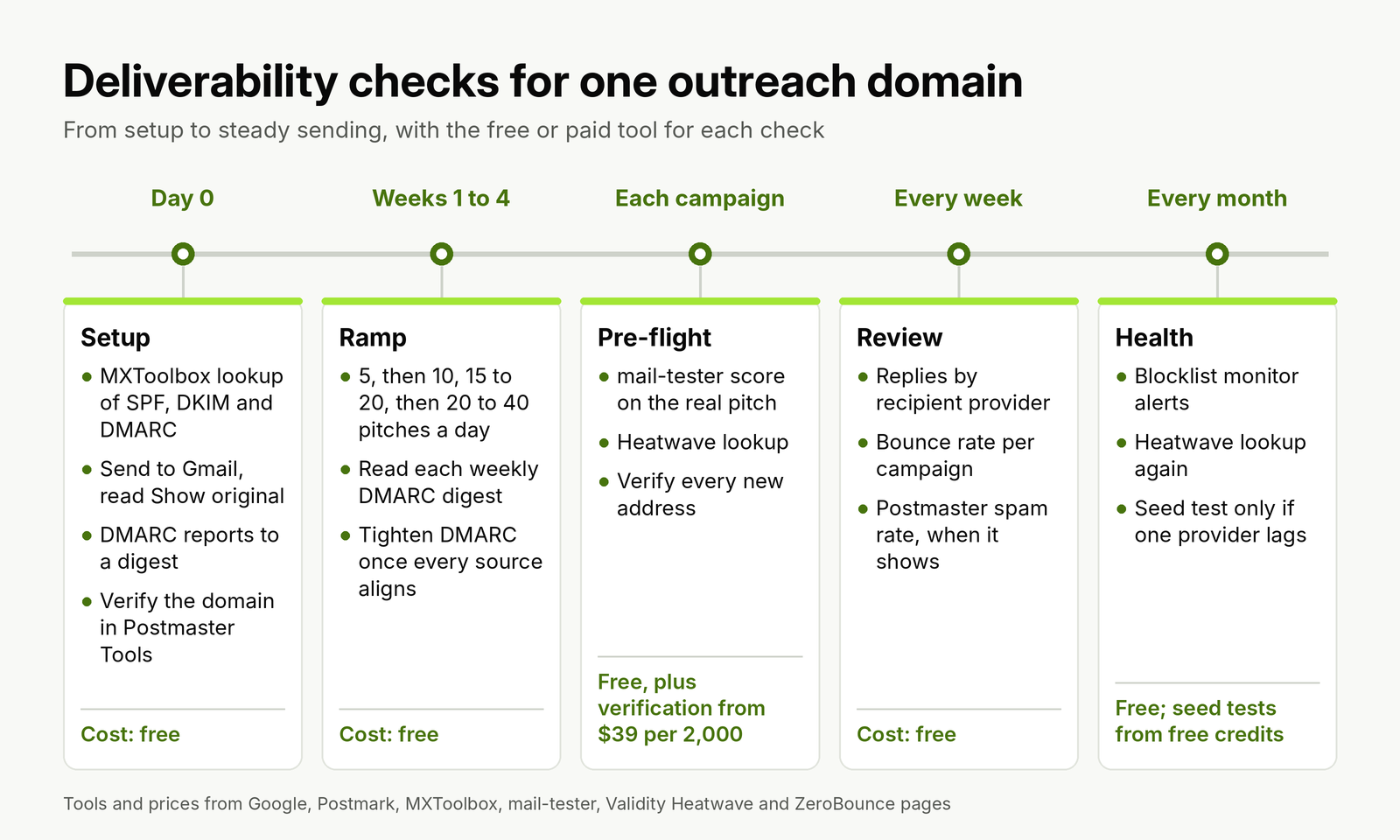
Most checks take minutes and cost nothing. The only recurring paid item for most outreach senders is verification.
Agencies running several clients should repeat the routine per domain, not per agency. A complaint on one client's domain stays on that domain, which is the reason to give each client its own, and the monitoring has to follow the same split.
Worked example: the deliverability stack for an agency with three clients
An agency runs outreach for three clients, one outreach domain and one mailbox per client, contacting 150 new prospects per client each month. That is 450 addresses to verify a month, or 5,400 a year. Here is what the tool stack costs at list prices from the table above.
- Free tools: Postmaster Tools, Postmark DMARC digests, MXToolbox's free monitor and lookups, Heatwave lookups and occasional mail-tester scores. $0.
- Verification, if the outreach tool does not include it: 5,400 addresses a year is three $39 packs of 2,000 on ZeroBounce, about $117 a year.
- Placement tests, if one client's domain shows a provider-specific drop: GlockApps Essential at $708 a year. Many agencies can start on the free credits and buy only when they need regular tests.
- Warm-up, which we would skip: MailReach for three mailboxes at $19.50 each is $702 a year, and it carries the Heatwave risk described above.
The full stack without warm-up costs about $825 a year for three client domains, and $117 if placement tests stay on free credits. Compare that with what outreach software already charges: the outreach tools compared on price and sending setup range from tools that include verification and sending limits to tools that leave both to you, which changes which lines above you need to pay for.
Deliverability inside linkOreach
We built linkOreach for link building outreach, and Linkzy is the AI agent inside it. Several deliverability jobs happen inside the outreach workflow itself: each address is checked for deliverability before anything goes out, built-in sending limits keep daily volume in check, and follow-ups stop the moment someone replies. You connect your own Gmail, Outlook or SMTP mailbox and send from your own domain, so the reputation you build stays with you. Our verification, sending limits and stop-on-reply sit alongside prospecting from Ahrefs data, a shared inbox and per-campaign reports.
We currently offer one plan at $49 a month, an introductory price, with 500 email credits that include finding and verification, 5,000 searches and 100,000 Ahrefs credits, and a 7-day trial with no credit card; extra email credits are $19 for 500 on our plan and credit pricing page. You stay responsible for your DNS records and mailbox setup, so pair it with the free tools above for authentication checks, DMARC digests, Postmaster Tools and blocklist lookups.
Pick something else if you send newsletters or promotional email to an opted-in list. An email marketing platform with its own deliverability team, plus a placement testing tool, fits that job better than outreach software.
Conclusion
Start every outreach domain with the free stack: verify the domain in Postmaster Tools v2, publish DMARC at p=none with a digest service reading the reports, confirm SPF, DKIM and DMARC pass in a real Gmail header, and add MXToolbox's free monitor and a Heatwave lookup. Expect Postmaster charts to stay empty at outreach volume, and skip SNDS unless you own your sending IPs.
Pay for verification if your outreach tool does not include it, and for seed tests only when replies fall at one provider and the free checks are clean. Skip warm-up networks; ramp new mailboxes from 5 to 40 real pitches a day instead.
If you want verification, sending limits and follow-ups that stop on reply inside your outreach tool, start a free 7-day linkOreach trial and run your next campaign from your own mailbox.
Frequently Asked Questions
What are email deliverability tools?
Tools that show whether your email reaches the inbox and why it might not. They fall into five jobs: checking DNS and authentication records, summarizing DMARC reports, showing mailbox provider data such as Gmail's spam rate, looking up blocklists, and testing placement with seed mailboxes. Verifiers sit alongside them by removing addresses that would bounce.
What is the best free email deliverability tool?
For outreach senders, Google Postmaster Tools is the one free tool with data straight from Gmail, and it is where Gmail's 0.3% spam rate requirement is measured. Pair it with a free DMARC digest, MXToolbox lookups and its free blocklist monitor, and Validity's Heatwave lookup. Together they cost nothing and cover setup, reputation and blocklists.
Why does Google Postmaster Tools show no data for my domain?
Two reasons are common at outreach volume. The dashboards count only mail sent to personal Gmail accounts, so pitches to editors on Google Workspace company domains are not included. And Google says dashboards might not include all data on days when your volume is low, to protect user privacy. Empty charts at 20 to 60 emails a day are normal.
How do I test email deliverability for cold outreach?
Send a real pitch from the mailbox you will use to a personal Gmail address and check that SPF, DKIM and DMARC all read PASS under Show original. Run the same message through a free mail-tester score. When replies fall at one provider only, run a seed test there, starting with free credits from GlockApps or ZeroBounce before buying a plan.
Do I need an email warm-up tool for link building outreach?
Usually not. Validity's Heatwave blocklist lists domains that use synthetic warming, and its policy treats a confirmed warming observation as permanent. Outreach volume is low enough to warm a new mailbox with real pitches, starting at about 5 a day and reaching 20 to 40 by the fourth week.
How often should I run an inbox placement test?
Before a new template or a new mailbox goes live, and whenever replies fall at one mailbox provider while the free checks come back clean. Repeat a spam result before acting on it, since one seed test is a single sample, and test the exact message from the exact mailbox you will send from.